This feature is available to gyms on the Business Tier and above.
A subscription promotion is a price adjustment applied to a subscription. It can have an expiry date or be set to apply indefinitely, ensuring that Promotions or special offers continue with the recurring billing cycles of your visitors.
» Available on Business & Above.

One-Time Discount
You can add a one-time discount to a subscription. This discount is only applied to the next billing cycle and is removed automatically after the next payment is processed. This ensures that temporary promotions or special offers are managed without requiring manual intervention to remove the discount later.
To set a One-Time Discount with Promotion Expiration, choose an expiration date that aligns with the next billing cycle. The date must be on or just after the next scheduled payment to ensure the discount is applied once. Once set, the discount will apply to the next payment and automatically remove itself after processing.
Perpetual Discount
Perpetual discounts are applied to every billing cycle of a subscription. These discounts continue indefinitely until they are manually removed.
This is useful for long-term promotions, loyal customer rewards, or special membership tiers. By setting up a perpetual discount, you can ensure consistent pricing for specific members over the duration of their membership.
Expiration Date
When a promotion has an expiration date, it will only be applied until that date. If the expiration falls before a billing cycle renews, the discount will not be applied. If the expiry date is set before the next billing cycle starts, the discount will not be applied.
Spend $20 off any subscription, which will be applied to memberships
If you wish to adjust pricing for subscriptions by €20 - which can be applied to membership billing
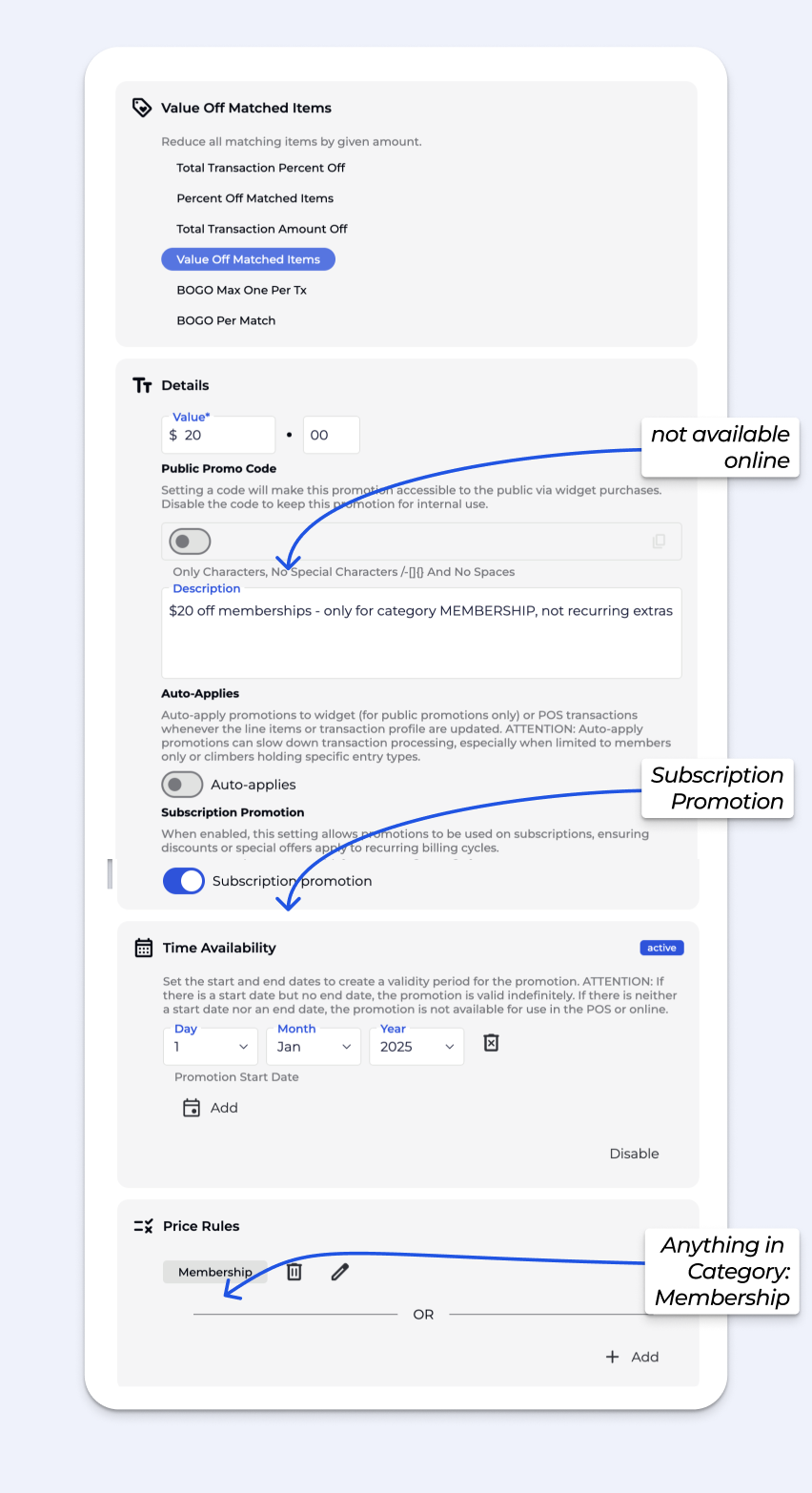
When you enable a subscription promotion, the discount is automatically applied to every recurring billing cycle, unless an expiration is set for that promotion.
This ensures that customers receive the promotional benefit each time their subscription renews.
You can set an expiry date for a subscription promotion to control how long it remains active. When a promotion has an expiration date, it will only be applied until that date.
 icon when this happens, indicating that the promotion has expired.
Example: A customer’s next billing date is 15 February.
To ensure the discount applies to that billing period, set the expiry date to 16 February or later. If the expiry date is set to 14 February or earlier, the discount will not be applied
Removing the expiry date makes the promotion perpetual, meaning the promotion will be applied to all future billing cycles. This is useful when you want the promotional benefits to persist without a fixed end date.
You also have the option to remove a subscription promotion entirely. Once removed, the promotion will no longer apply to any recurring billing cycles for that subscription.
A promotion adjusts the price of items in a transaction. It can be applied manually or automatically based on set conditions.
Yes, promotions are available across both channels. To make the code available online, simply toggle the Promo Code, and set a promo code. The promo code can be used in your widgets.
If no end date is set, the promotion remains valid indefinitely until it is manually deactivated or updated.
Without a start date, the promotion is active until the end date. With neither a start nor end date, the promotion is not active and will not be available for application either in the POS or in online sales widgets.
BETA is designed to apply a single promotion per subscription to maintain clear, predictable and trackable subscription pricing.
Multiple stacked discounts complicate auditing billing, understanding member payments and LTV, and evaluating promotional effectiveness.
Multiple stacked discounts make it hard to audit billing, understand what members are paying & LTV, and measure how promotions are actually performing.
The POS promotion is applied only to the visitor’s first bill and there BETA allows multiple promotions to be stacked together.
Ongoing promotions must be linked directly to the subscription, and the current model allows for only one active promotion per subscription. This is to keep subscription pricing clean and trackable.
No, if a promotion’s value is edited, historic transactions will NOT be affected. All future transactions will be bound to the new settings.
You can create a pay-what-you-want at your gym by offering a perpetual discount tied to the subscription.
A perpetual discount allows members to pay what they want, and it is applied to every billing cycle. Simply set up a discount in BETA and link it to your subscription plan. The perpetual discount remains active indefinitely until manually removed.
When applying a promotion to a subscription, it will only apply that discount for the next payment cycle, unless it was applied as a perpetual discount in the Subscription Pop Up.
When a promotion has an expiration date, it will only be applied until that date.
If the expiry date is set before the next billing cycle starts, the discount will not be applied.
Example: A customer’s next billing date is 15 February.
To ensure the discount applies to that billing period, set the expiry date to 16 February or later. If the expiry date is set to 14 February or earlier, the discount will not be applied.

Still Lost? We’ve got you covered!
Use the search box on the main Help to search the entire list of available help guides, or drop your question in the Support Chat!


