
Want to speed up your waiver signing process? In BETA, you can set the default country in your form so people do not have to find it in the drop down list.
Navigate to Settings Page » Form Settings » General » Default Country » Select an option from the dropdown menu.

Specify the fields that visitors are required on your forms. This allows you to gather essential contact information and addresses as needed for your records*. Here are the field requirements you can set:
Require Address: Collect full address details, including street information.
Require Phone: Obtain phone numbers for better visitor contact.
Require Certain Address Fields: Specify particular address details:
Country: Set a mandatory field for country selection.
Region: Require the visitor's region or state.
Postcode: Collect the visitor’s postal code.
City: Make it mandatory to include city information.
These settings will show once the visitor lands on the Form widget page.
The fields you chose as will appear as required* and visitors will not be able to proceed to form completion before filling in the fields.
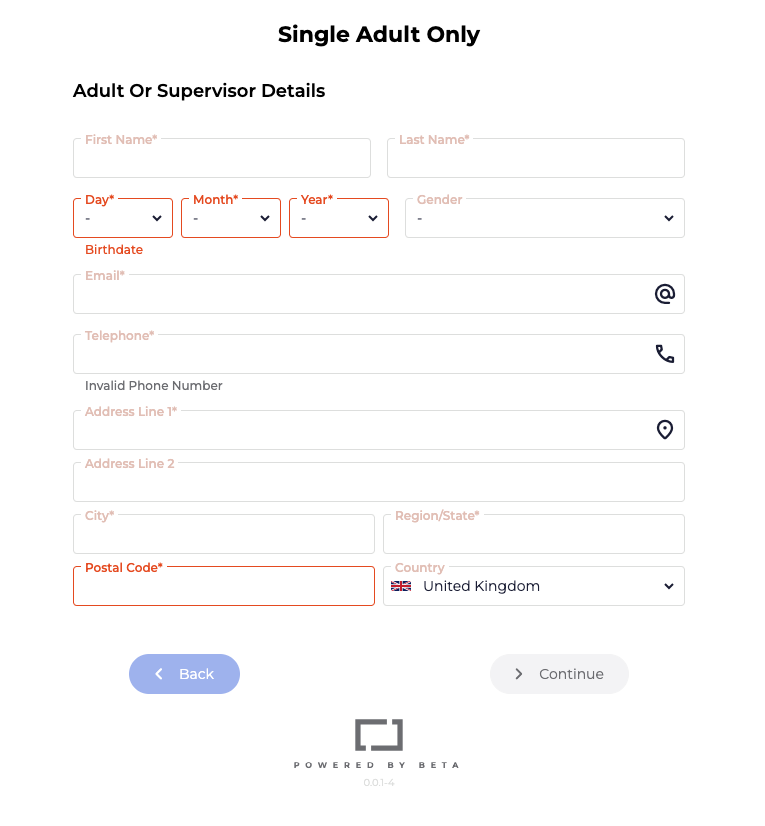
Across the gym, you can make the fields in your form be required such as phone, address, country, region, postcode, city.
Adding a default country and required fields are gym-wide settings. Once enabled, they will apply to all forms.
If you’d prefer these settings to apply only to specific forms, you can follow the additional steps below:
Turn off the global setting entirely, as below
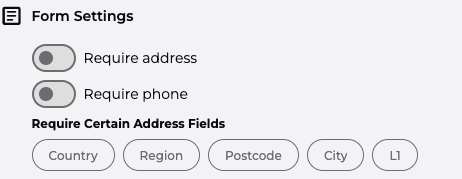
Use URL parameters in the form widget for the specific form where you want these settings applied.
Navigate to BETA’s Marketing Page » Form Widget » Select Forms you wish displayed to generate an URL and copy URL, so you can edit it as needed
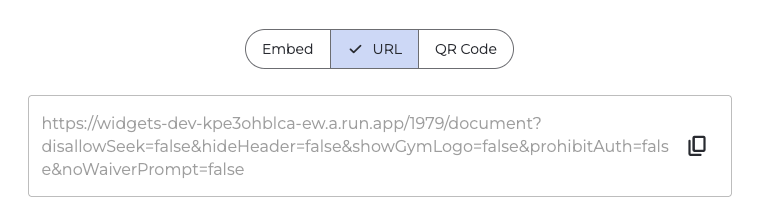
Add at the end of your form’s widget URL
» if you want all address fields to be required
&requireAddressFields=city,region,postcode,country,l1
If you want only specific fields to be required, omit any fields by removing them from the parameter
» e.g., if you only wish city & country to be required only add the below to the URL
&requireAddressFields=city,country
