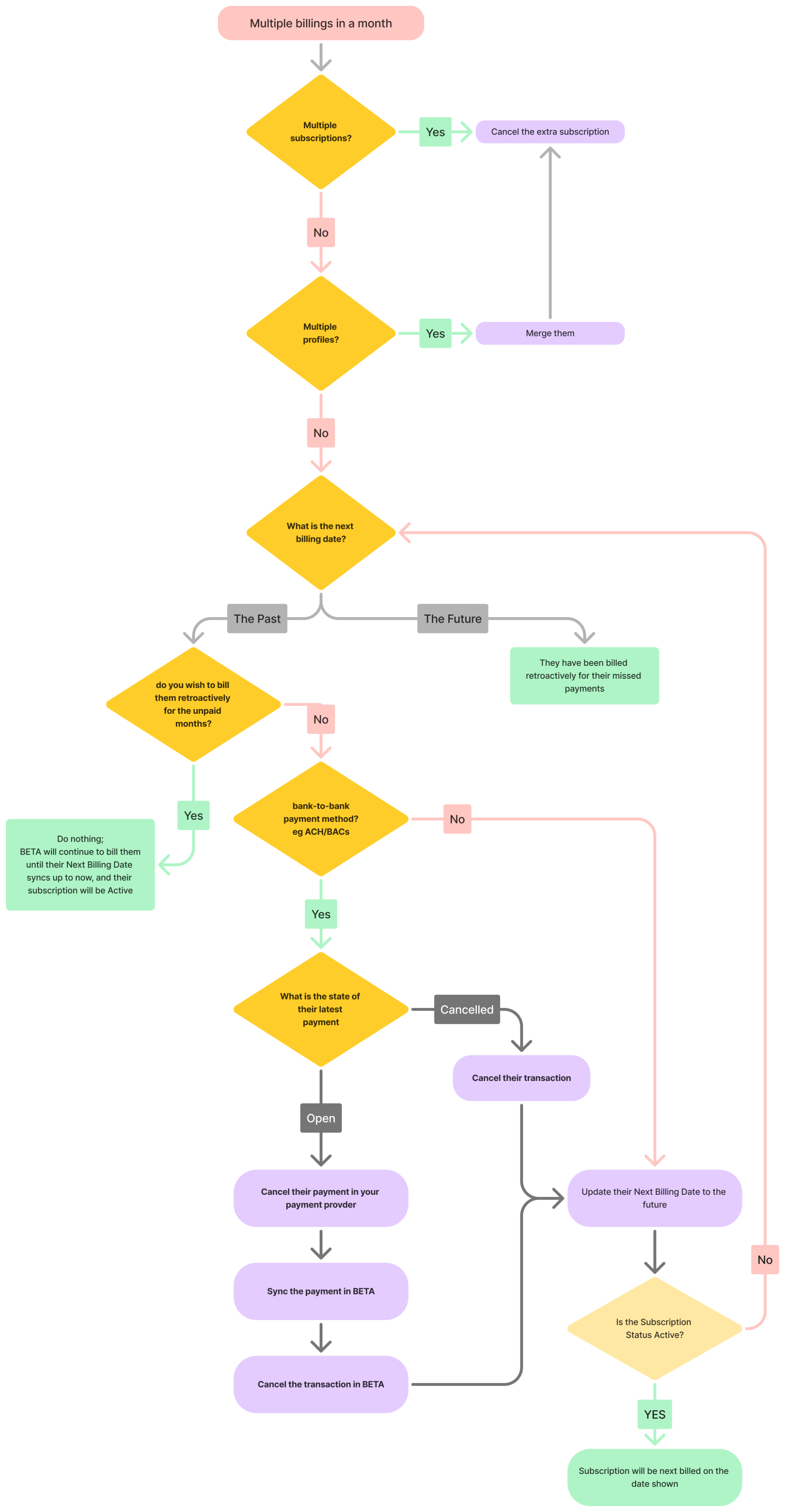
If a customer is being billed multiple times for their subscription, there are a few possible reasons for this issue. Follow these steps to identify and resolve the situation effectively.
If a single profile has multiple active subscriptions:
Navigate to their profile, Transactions > Subscriptions › Subscription Management
Cancel a recurring auto-billing subscription: Retain only one subscription to ensure a single billing.
How can this happen?
E.g., Climber A has purchased multiple subscriptions; Climber A paying for Climber B.
If the customer has multiple profiles, each with active subscriptions:
Use the search to search using their email/s or name or surname alone to look for other similar profiles
Merge visitor profiles: Combine the profiles into one to consolidate their subscriptions.
Cancel a recurring auto-billing subscription: Cancel the duplicate subscriptions.
Mange Payment Profiles & Payment methods: Assign a default payment profile and method for the merged profile.
How can this happen?
Climber A has purchased a subscription, and then purchased or was sold another using different profile.
If a payment method was added to a subscription with an overdue billing date, BETA will trigger payments for all missed payments. You can check this by:
Navigate to their profile, Transactions > Subscriptions › Subscription Management
Check the Status of their subscription:
if their subscription is Active, they were billed for all their missed payments
if their subscription is Overdue, BETA will continue to bill them for all their missed payments
if their subscription is Processing, BETA has actively submit a transaction to their billing method’s payment provider
date of the Next Billing Date, in the Overview Page
if the Next Billing Date is ±3-7 days in the past, and there is a processing payment -
if the Next Billing Date is one/multiple billing period/s in the past, BETA will continue to bill them for all their missed payments. BETA automatically processes
How can this happen?
Let’s say Climber A has a subscription that began on January 01, but no valid payment method was on file. Meaning they have a subscription remains unpaid from their January 01. In June, they add a payment method to their subscription.
On adding the payment method, BETA processes the subscription's retroactive payments automatically.
Meaning: Climber A is billed for all unpaid months since January 01 (January through June).
Their billing cycle remains tied to the original subscription start date, so subsequent payments will continue on the 1st of each month unless the billing date is manually adjusted.
The billing date for the subscription does not change unless updated manually, meaning the subscription is being processed for all missed dates. Use the overview tab on the subscription popup to understand their Next Billing Date. BETA will cycle through all of the missed bills.
To avoid Retroactive Billing of the subscription:
Extend a subscription with Update Billing Date: Update the subscription's billing date to skip past months.
Cancel and Start Fresh:
Cancel the old subscription,
and sell a new one, the newly sold subscription will have a fully independent subscription.

…Please contact the BETA team with any questions…

Still Lost? We’ve got you covered!
Use the search box on the main Help to search the entire list of available help guides, or drop your question in the Support Chat!
