Welcome to the BETA’s Changelog & Release Notes
Here, you’ll find the latest features, improvements, and updates we’ve rolled out to make managing your climbing gym smoother and more intuitive.
We’re always listening to your feedback, so check back often to see what’s new and how your ideas are shaping BETA. Thanks for all your feedback! It genuinely helps us shape BETA into something better for everyone.
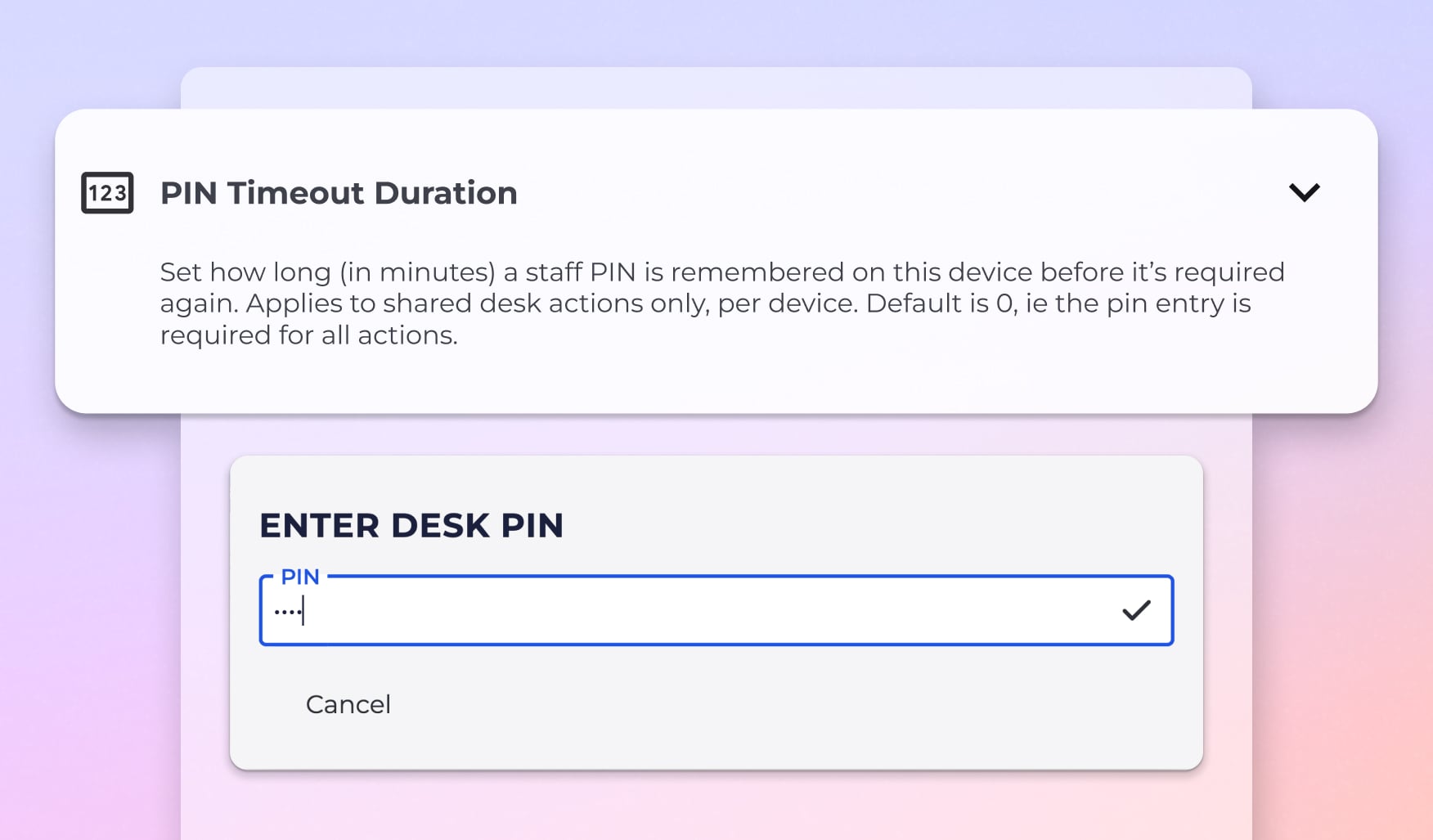
Set how long a staff PIN is remembered on a shared device before it’s required again, alongside smarter product management and improved support notifications.
› Features
Staff PIN timeout: Set a duration (in minutes) that a staff PIN is remembered on this device before being required again.
Applies to shared desk/POS actions only
Configured per device
Default is 0 minutes, meaning a PIN is required for every action
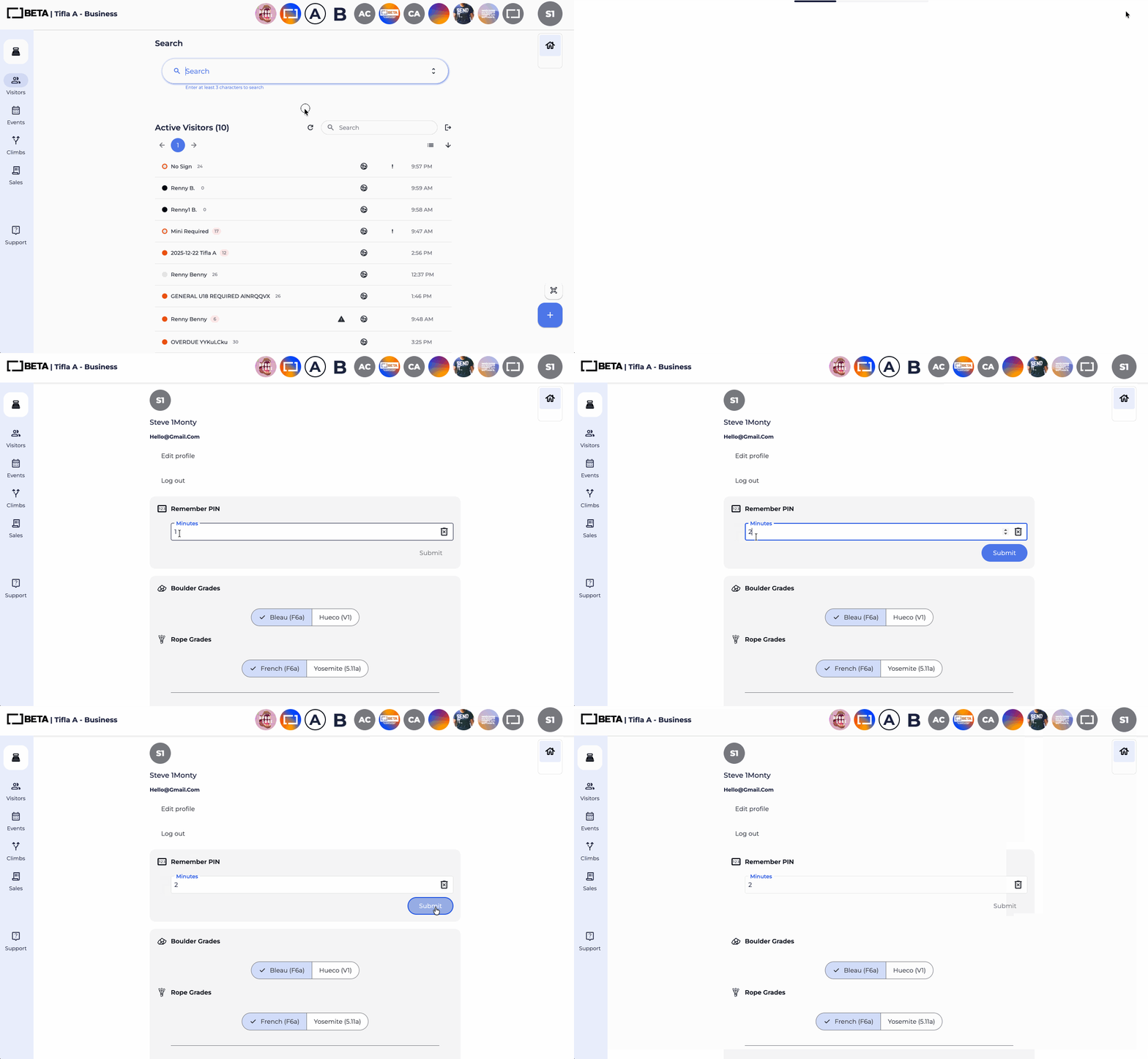
See how to set Staff PIN timeout below: Profile picture » PIN timeout » Set timeout in minutes
› Improvements
Stock configuration sorting: Product » Stock Tab now sort by colour and size, including handling common size formats (S, M, L) and numeric values.
Faster product creation flow: “Create product” now appears after entering 3 characters, speeding up workflow.
Expanded product search: Searching by manufacturer and brand is being added.
Event auto-cancellation updates: Behaviour refinements for handling email. Default Cancellation email is sent to both participants and hosts if event is auto-cancelled. — Business & Above
Support message Notifications: Notification badges now highlight unread messages from BETA support.
This update focuses on improving route management, event enrolment, membership handling, and payment clarity, alongside general UX/stability enhancements across the app.
› Features
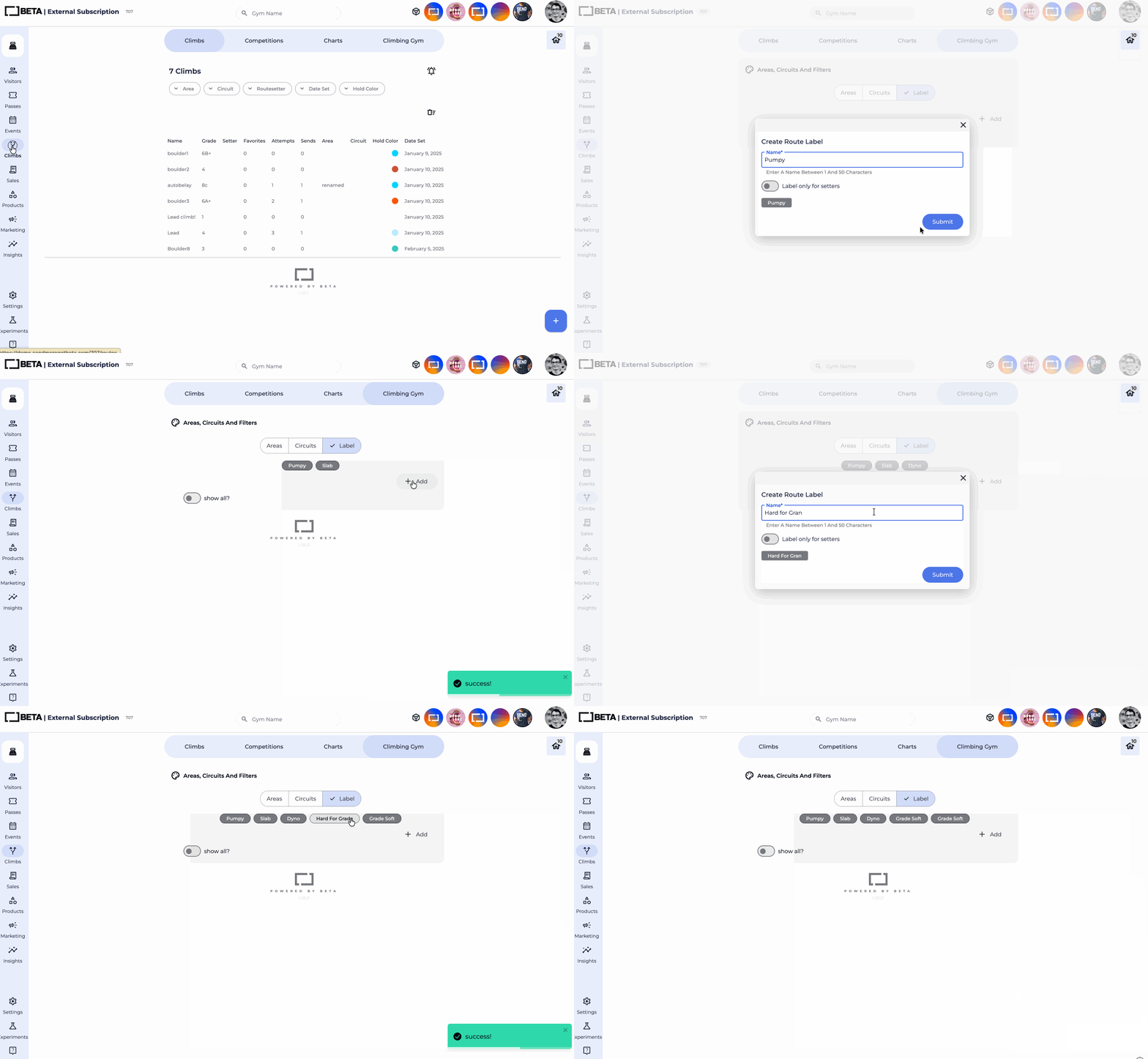
You can now customise and edit Route Labels directly within the Gym Routes section and during route creation, giving you clearer organisation and better filtering across the app and dashboard. Labels can be set to used by setters only too.

› Improvements
App Transaction Receipts in the app now send receipts directly to the climber’s email address.
App Tag Based Pricing is available in the app — Enterprise & Above.
Delete saved payment method, Climbers can now remove a saved payment method in the app when multiple payment methods are stored.
UI refinements across checkout flows, for the handling of Gift Cards in the app, and Promo Codes in the app. Including improvements across app interactions and translations in French and Spanish.
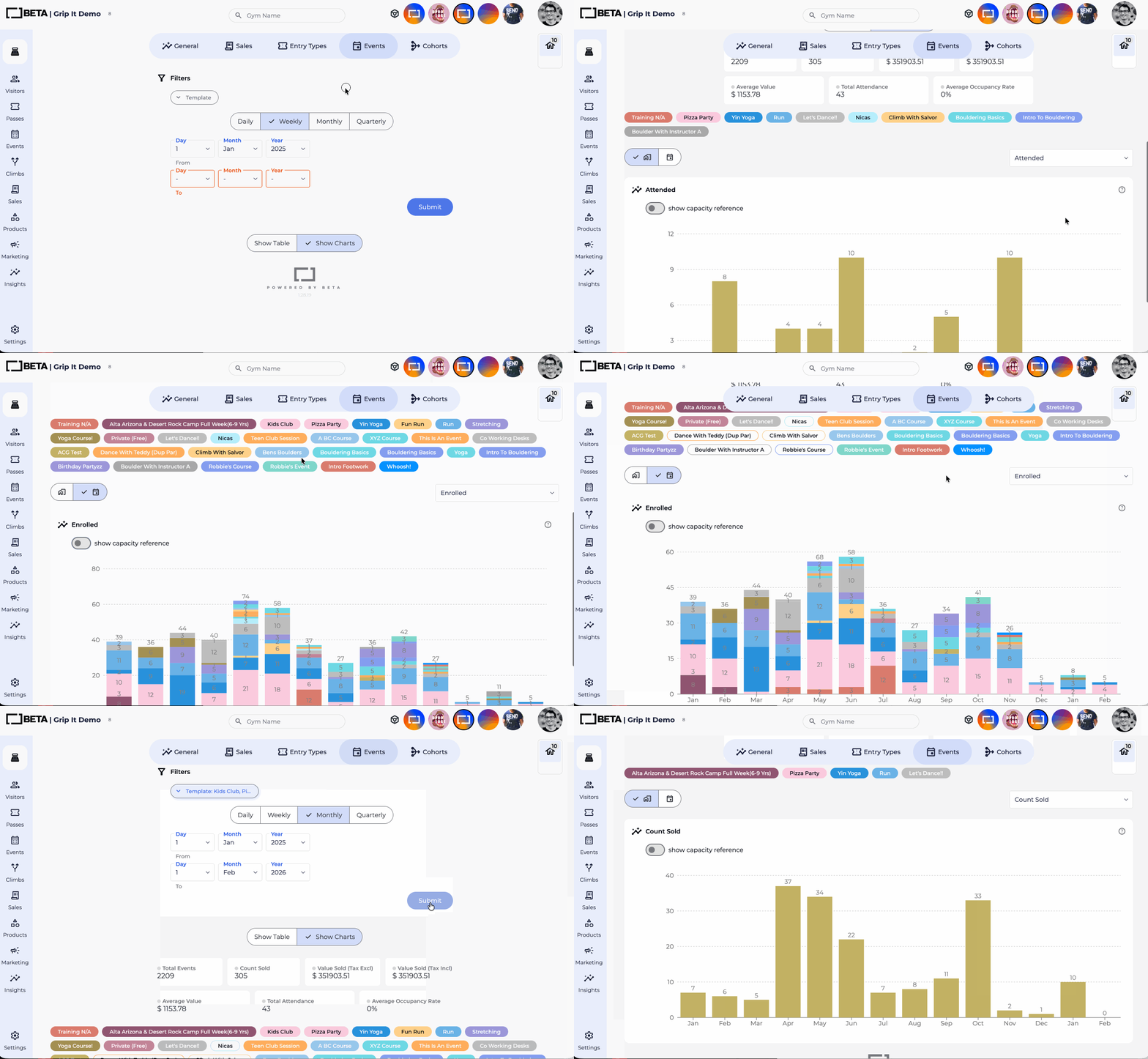
This update introduces updated event reporting metrics, interactive charts, and capacity tracking tools. Available on Business & above.
› Features
Expanded event reporting metrics: Insights » Events prebuilt dashboards now include:
Total successful event sales (including tax)
Total successful event sales (excluding tax)
Total value of discounts applied
Total number of paid bookings
Number of scheduled events
Number of cancelled events
Participants checked in
Participants enrolled but not checked in
Cancelled participant bookings
Total capacity across scheduled events
Capacity reference toggle: Enable “Show capacity reference” to overlay a capacity line on charts, helping you compare performance against potential maximum attendance.
Raw data downloads: Download the underlying data for scheduled events, bookings, or participant lists directly from the reporting view.
Multi-location reporting split: For multi-location gyms, reports can be viewed in aggregate or split per location.
Template-level reporting: View performance by event template to compare different event types.
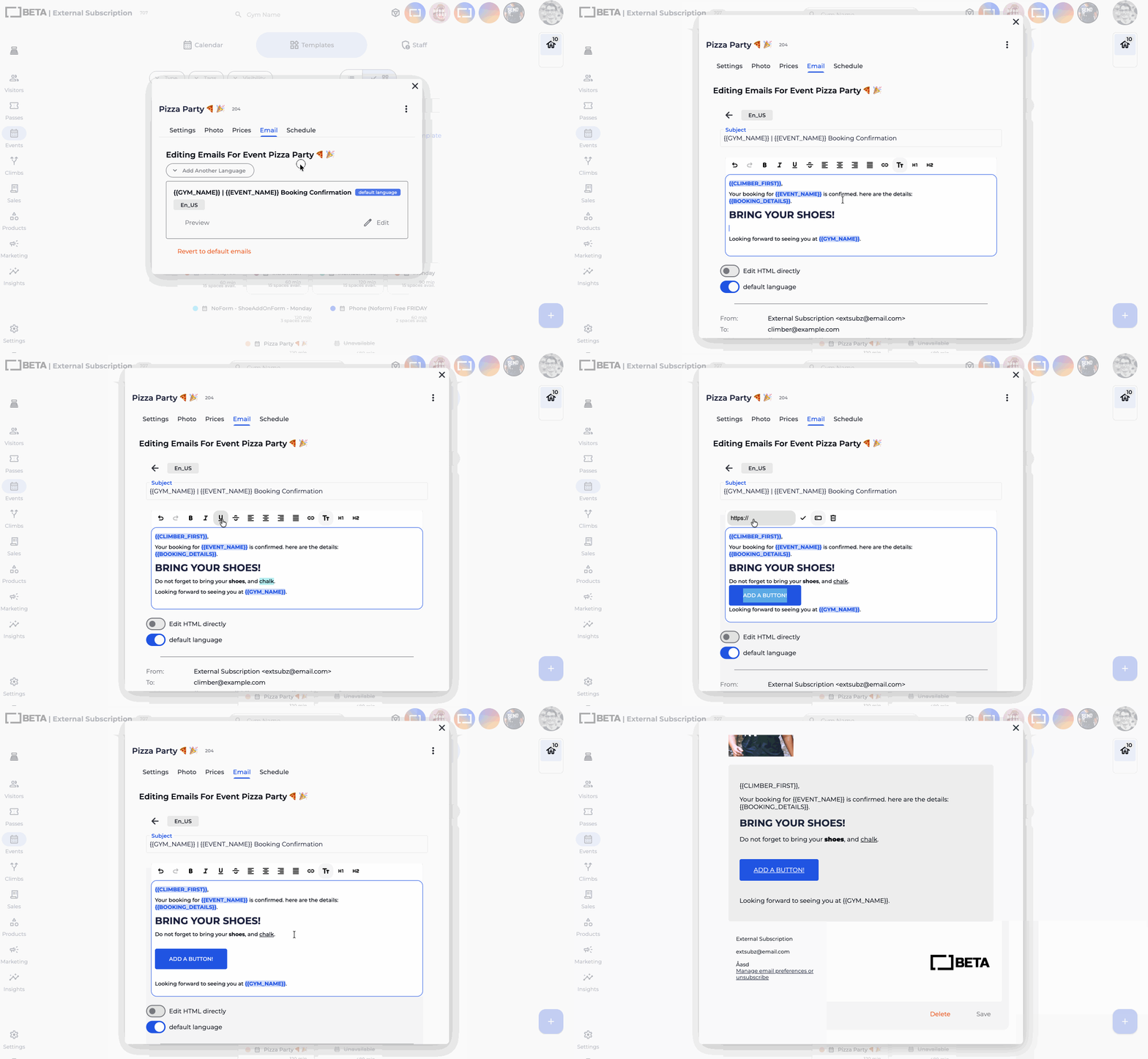
Visual email WYSIWYG editor: Format and edit HTML content directly in BETA for event emails, participant emails, and all other email templates. Advanced users can still edit the raw HTML for full customisation.
› Features
Location prompt for parent gym (multi-location) guest checkins: When checking in a guest or gifting a pass from a parent gym, you’re now prompted to select the location. This primarily applies to multi-location facilities - Business Tier.
Save filters in Advanced Reporting: Filters can also be saved directly from the Reporting page for reuse - Enterprise Tier.
› Improvements
Cross-location visit history (multi-location): Visit history shows visits across all locations, giving multi-site gyms an overview of visit activity - Business Tier.
Advanced Sort UI: Multiple stacked filters in Advanced Sort and Reporting are now displayed more clearly for easier understanding.
This release improves voucher handling, expands search and sorting capabilities, and refines supervised climbers workflows.
› Features
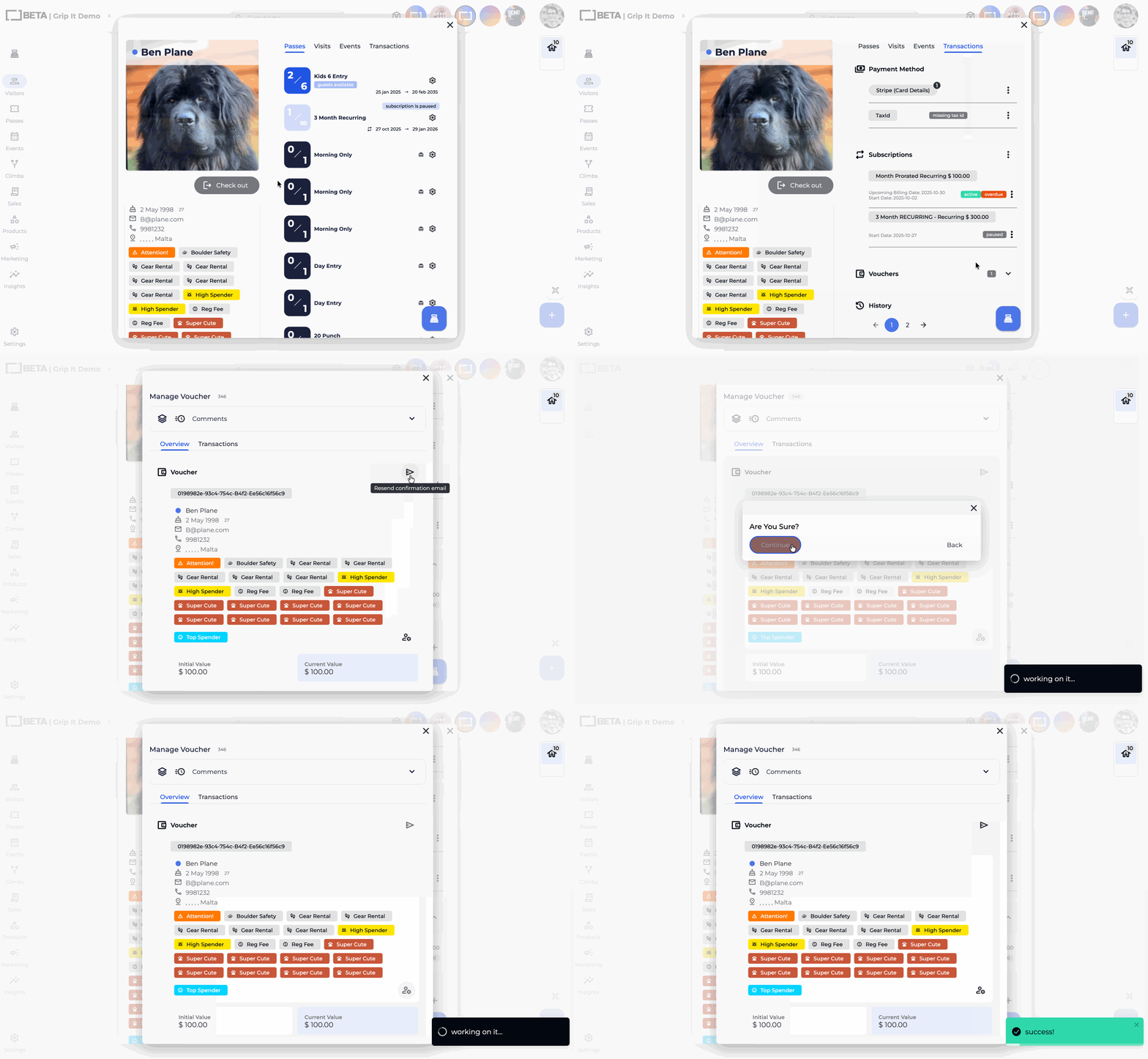
Resend voucher emails: Vouchers can now be re-sent directly to the original recipient. Emails are sent to whom the profile the voucher is linked to.
› Improvements
Active Climbers search: Search filters on the Visitors » Active Climbers searches through all pages of Active Climbers
Supervisor assignment flow: The “add supervisor” popup now suggests existing family members when applicable.
Gym details to voucher exports: Voucher exports include the gym name and gym key.
Advanced sort time range: Advanced sorting supports data going back up to 10 years.
This update gives gyms clearer visibility into subscription payment retries behaviour and, on higher tiers, full control over retry schedules.
› Features
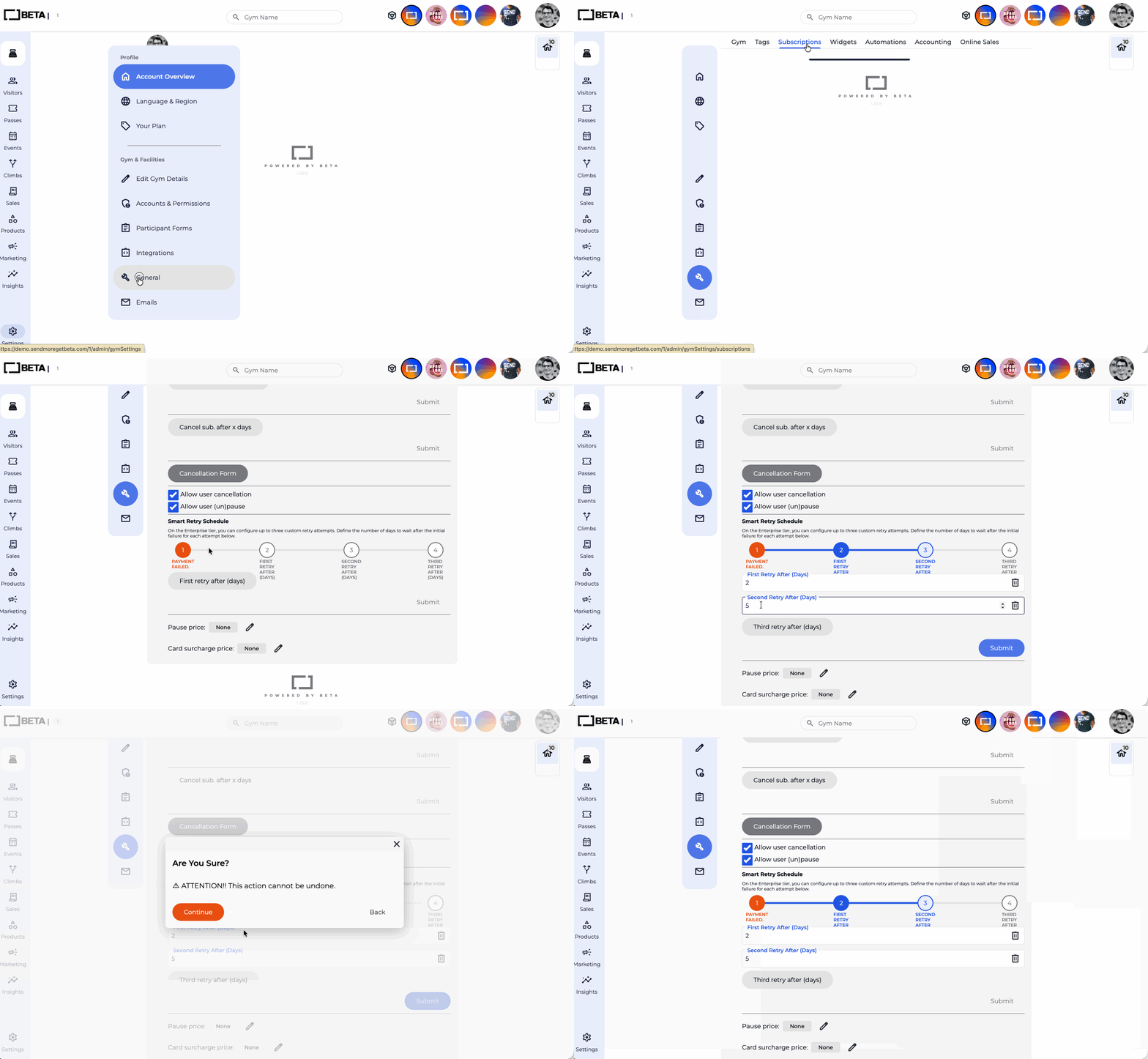
Configurable retry schedules: Gyms can now define up to three custom retry attempts, including how many days to wait after the initial failure for each retry.
Community: One automatic retry after 1 day.
Business: Two automatic retries after 1 day and 3 days.
Enterprise: Configurable retry schedule (up to three attempts).
Retry configuration visibility: Retry status and schedules are now clearly shown under Settings » Subscriptions » Smart Retry Schedule
› Improvements
Bank payment processing via Square (DirectDebit/ACH): Subscription payments made by bank transfer are now correctly updated once Square confirms the transaction. Successful payments update the subscription due date and issue the pass automatically.
QR check-in restrictions: Visitors using the “Share my Profile QR code in the app” option will be blocked from checking in at Turnstiles, Kiosks or Dashboards marked if Entry Type is marked as “scan-prohibited”.
› Features
Participant list sorting and search: Sort event participants by Enrolment Time or Alphabetically, and search within the participant list for faster access.
Event titles in calendar views: Scheduled and existing events now display clearer titles for easier identification.
› Improvements
Event calendar list view: Visual updates improve readability, including clearer past-event styling and better layout consistency.
UI Improvements on the Events Page: Tooltips, button alignment, tag handling, and instructor indicators have been refined for a smoother workflow.
Subscription Billing in POS via PIN: Fixed PIN entry when accessing subscriptions.
› Features
Edit tab for competitions: You can now edit competition name, public visibility, and archived status directly from the Climbs competition tab.
Competition archiving: Archived competitions are hidden from the BETA app and public results, while remaining fully accessible to staff in the dashboard.
Public sign-up control: Competitions can be opened or hidden from public sign-up in the BETA app. Public sign-up is only available for non-archived competitions.
› Improvements
ALLOW RE-ENTRY Turnstile behaviour for time-limited Entry: For passes with “Entry Times limitations” (e.g. off-peak passes), climbers who check in during their allowed entry time can continue to enter and exit through the turnstile, even if they leave and return outside the allowed window, as long as:
they remain checked in
and the setting ALLOW RE-ENTRY is enabled in your turnstile setting
For Example, Off-peak pass
Allowed entry time: 09:00–16:00
Check-in time: 15:00
A climbers checks in at 15:00, which is within your allowed entry window.
At 17:00, you exit the gym to go to the café.
Because you are still checked in, you can re-enter through the turnstiles — even though it is now outside the off-peak entry time.
Competition list visibility: UI of Archived competitions has been updated, shown with a strikethrough, greyed styling, and sorted alphabetically. Updated visual indicators (colour and strikethrough) make competition status easier to understand.
Adding climbs to competitions: Only non-archived climbs are shown when assigning climbs to a competition.
Settings Navigation labels: “Settings” has been reorganised to Settings » General for clarity.
Info Text across the platform: Updated information text for competition flows, subscriptions, passes, sales search, tooltips, and error messages.
› Features
Entry type archiving: Entry types can now be archived to remove them from lists without affecting passes that have already been issued.
Full entry type editing (with confirmation): You can now edit all settings on an entry type after typing to confirm.
Logs on Entry Type editing: Editing an Entry type, is tracked via the logs.
Guest Check-In Outside of Entry Times limitations: Guests can now be checked in even if entry time limits are exceeded. Available on Enterprise & Above.
Navigate to the Entry Type » Guest Entries, to enable this.
› Improvements
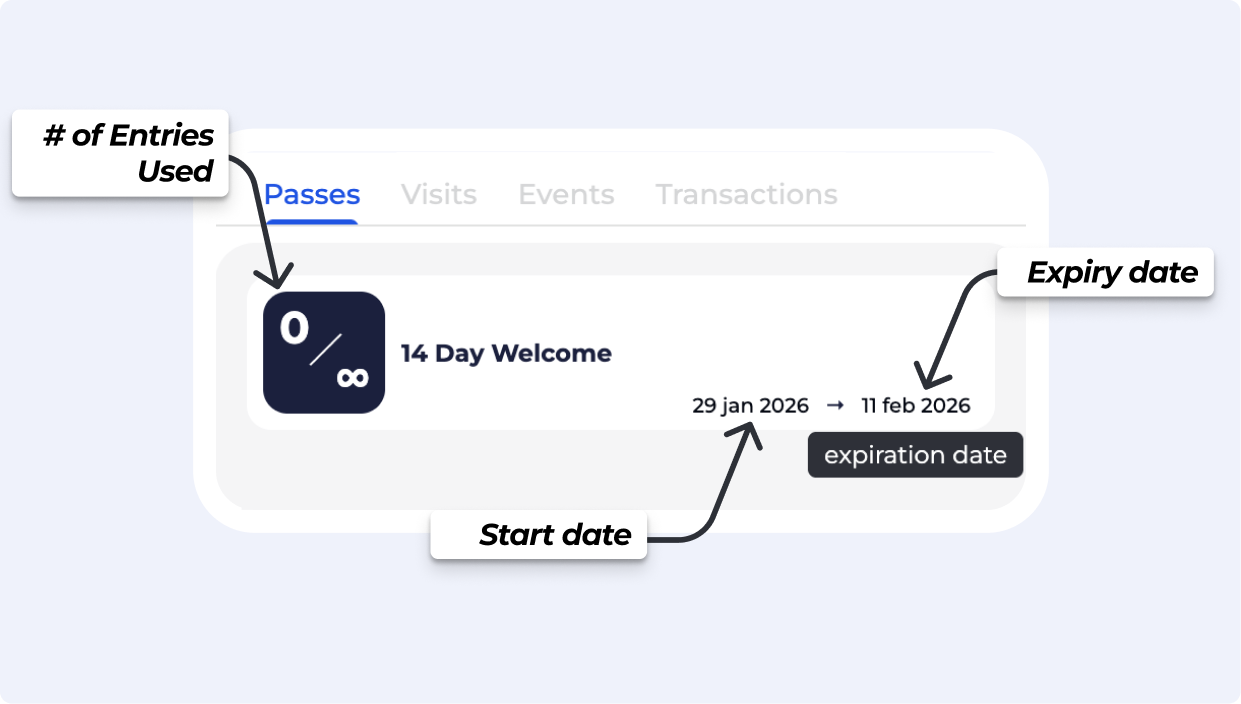
Pass date visibility: The start and expiry day of a pass are now shown more clearly in the UI.
› Features
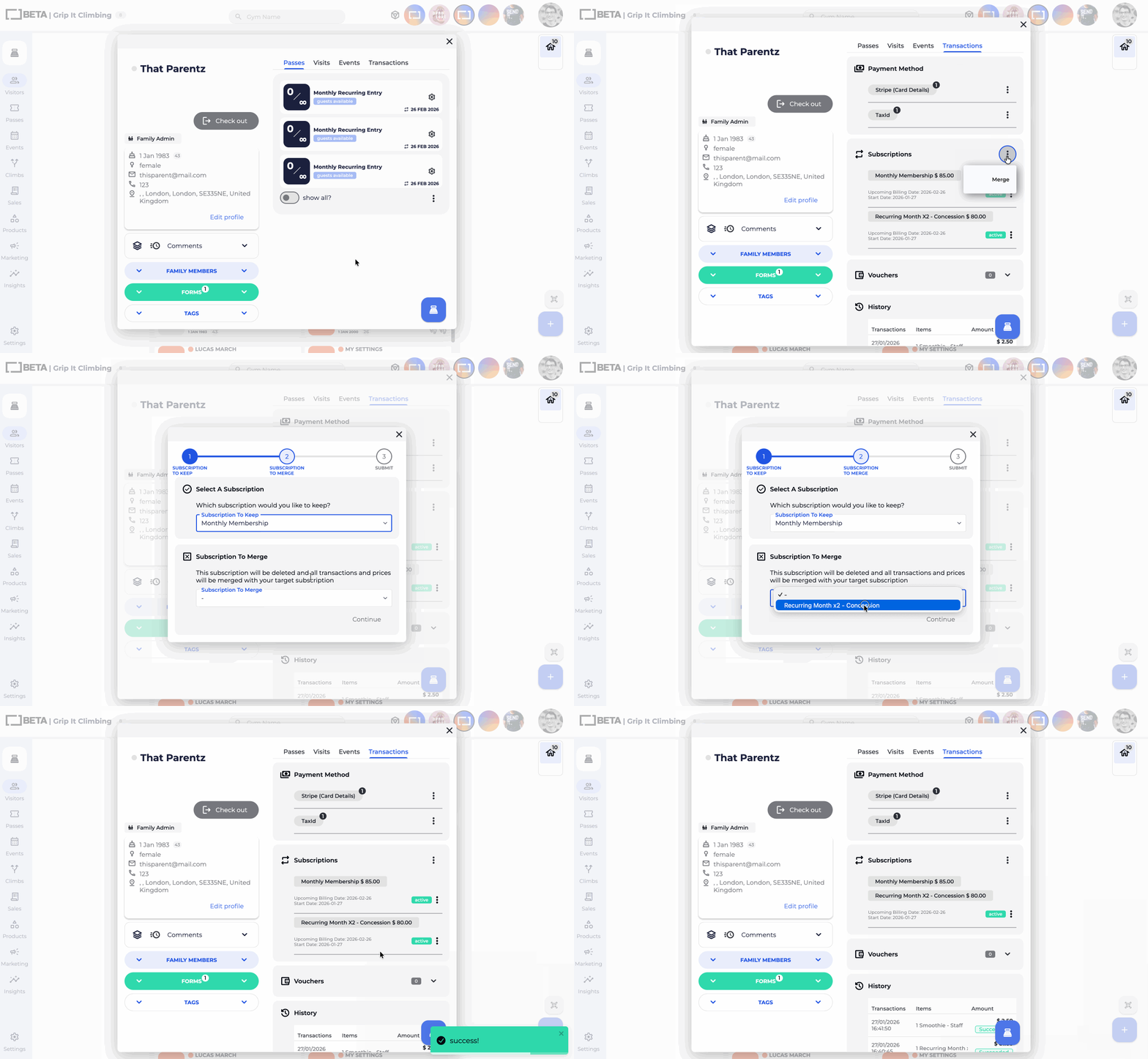
Merge Subscriptions: You can now consolidate multiple subscriptions into one directly from a climber's profile. If a user has multiple subscriptions with the same billing cycle, you can merge them to simplify their billing.
Choose which subscription to maintain as the primary. The secondary subscription is merged, and all associated transactions and pricing history are seamlessly moved to the target subscription.
› Improvements
Streamlined Pass Purchases: We’ve overhauled the Passes Widget with cleaner layouts and more prominent Call-to-Action (CTA) buttons. Adding items to your cart or completing a purchase is now faster and more intuitive.
Dashboard Clarity: Updated descriptive text and action labels throughout the dashboard to ensure instructions are easy to follow and navigation is crystal clear.
› Improvements
Improved Error Handling: Added clearer, more descriptive error messages when an invalid payment method is selected in the checkout widgets.
Product Price & Product Option (variant) Key in Reports: Sales reporting exports include the unique BETA Product Key, useful when cross referencing sales reports
› Features
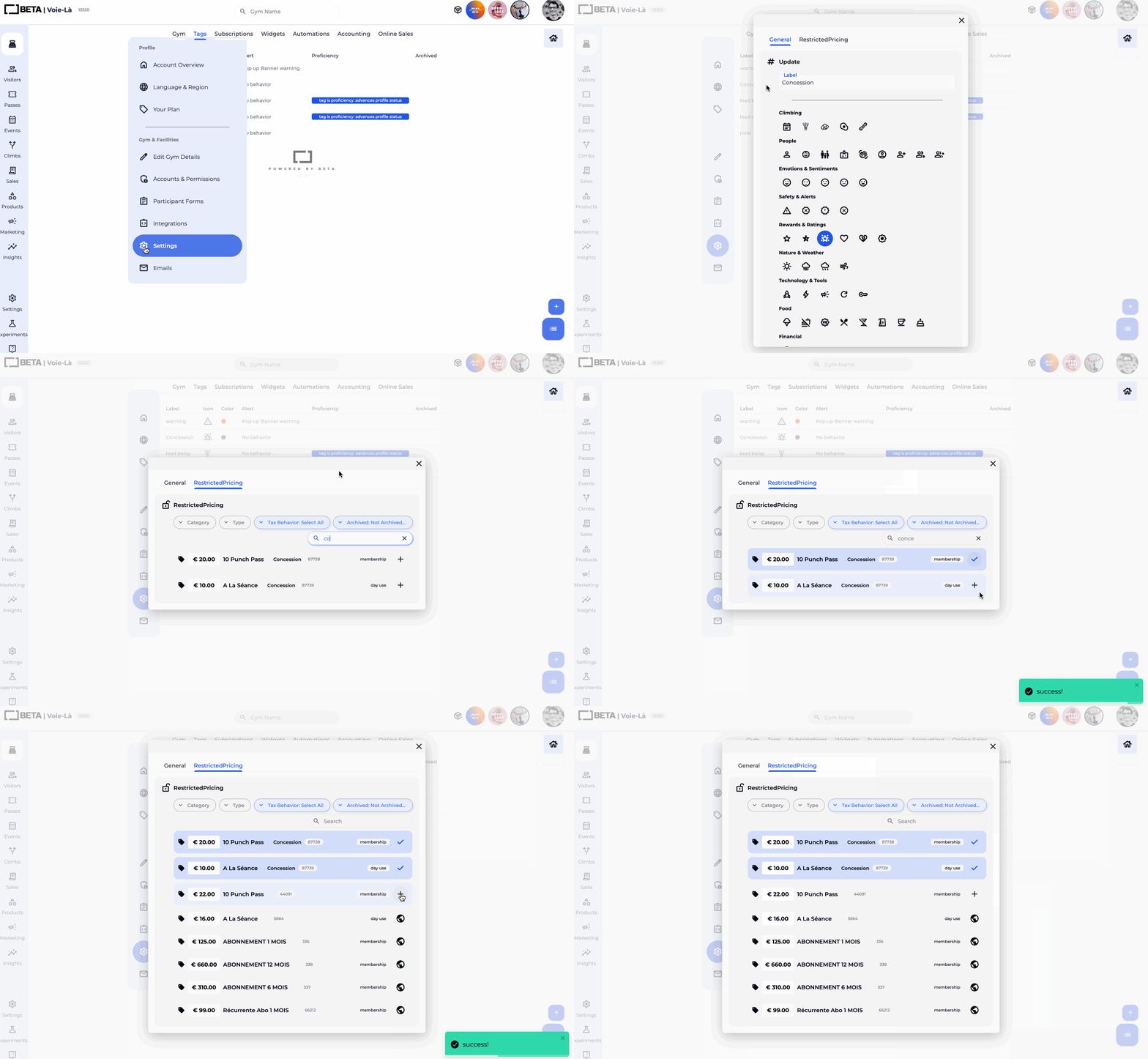
Tag-Restricted pass pricing: You can now make specific pass prices available based on profile tags. Eligible tagged profiles will see “For you” pricing in the pass widget when logged in. Updates to the BETA app to follow! (Enterprise & Above)
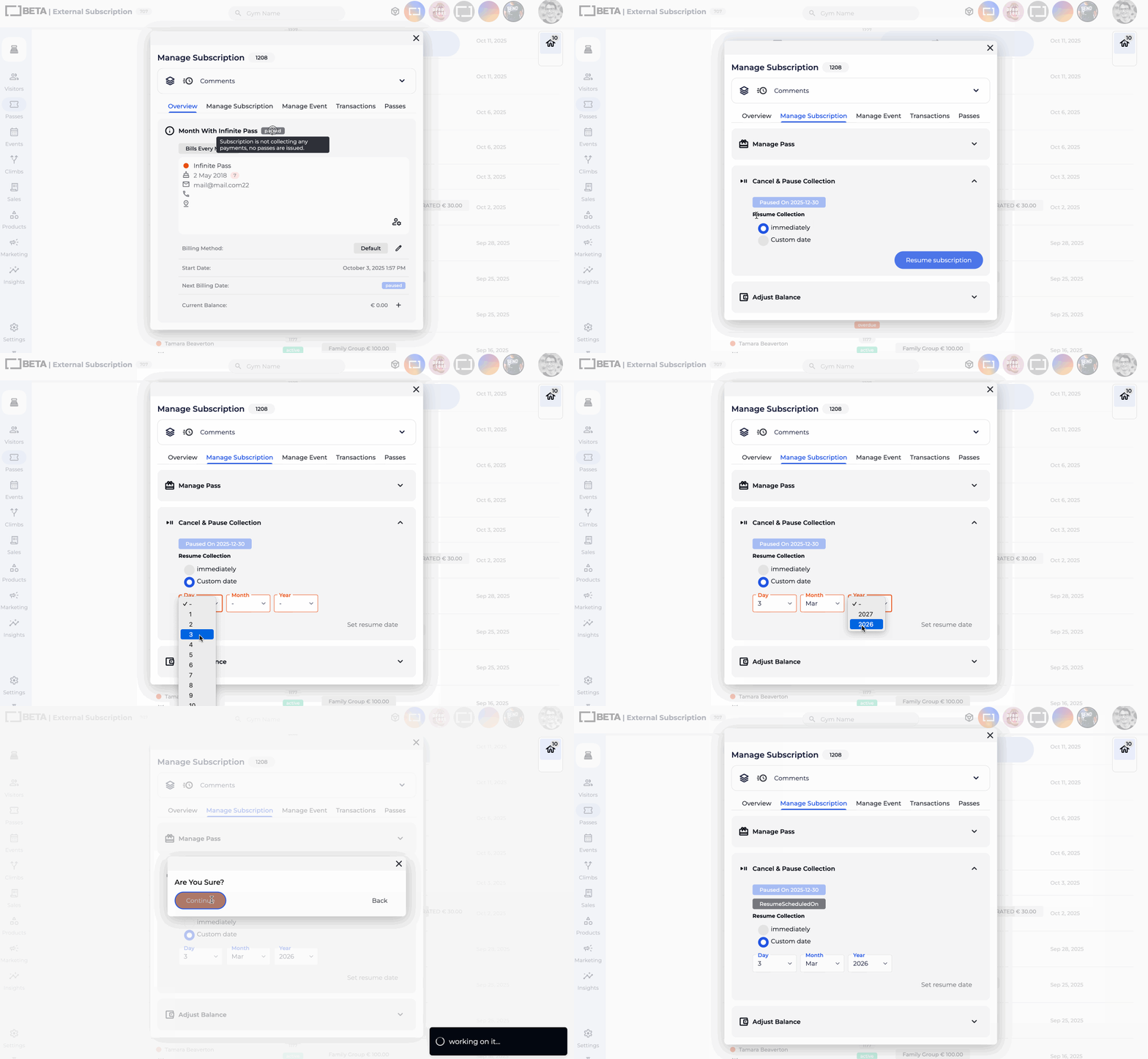
Schedule Resume Collection: Paused Subscriptions can be set to resume collection automatically on a future date. This applies to future un-pausing only, with more updates to come for scheduling pausing! (Business & above)
› Improvements
Voucher .csv download: A .csv report can now be more easily downloaded directly from the BETA dashboard.
Historical Data Reporting: Advanced SORT now supports migrated historical data. Multi-location gyms also get a new attendance filter scoped to a single location. (Business & above)
Visit metrics display, “Visits today” and “visits yesterday” are hidden when the selected period does not include today.
Event widgets with hidden sub-events: When the visibility of the Event template in a Course, is set to Hidden, the Event Template will still display, only if part of a course.
Invalid email for Dojo payments: Customers with invalid emails can now be created successfully to avoid blocked terminal payments.
› Improvements
Time picker across time zones. Date presets (last week, this week, last month, this month) now display in all time zones.
Course date display in Member Home. Course dates are now displayed more clearly for members.
Booking form tooltip. The tooltip in event popups on the dashboard is wider and easier to read.
Subscription list blank screen. Resolved an issue where the page could appear blank when no subscriptions were returned.
› Features
New widget styling options, More control over layout and appearance so you can customise widgets to match your brand.
Option to remove “Login” from the widget header: Useful on shared devices such as public tablets. Available on Community & above.
Option to remove the forms prompt at checkout: Removes the final “sign forms” step in the purchase flow when not needed. Available on Community & above.
Gym image in the widget header: Display your gym’s image directly in the header. Available on Enterprise & above.
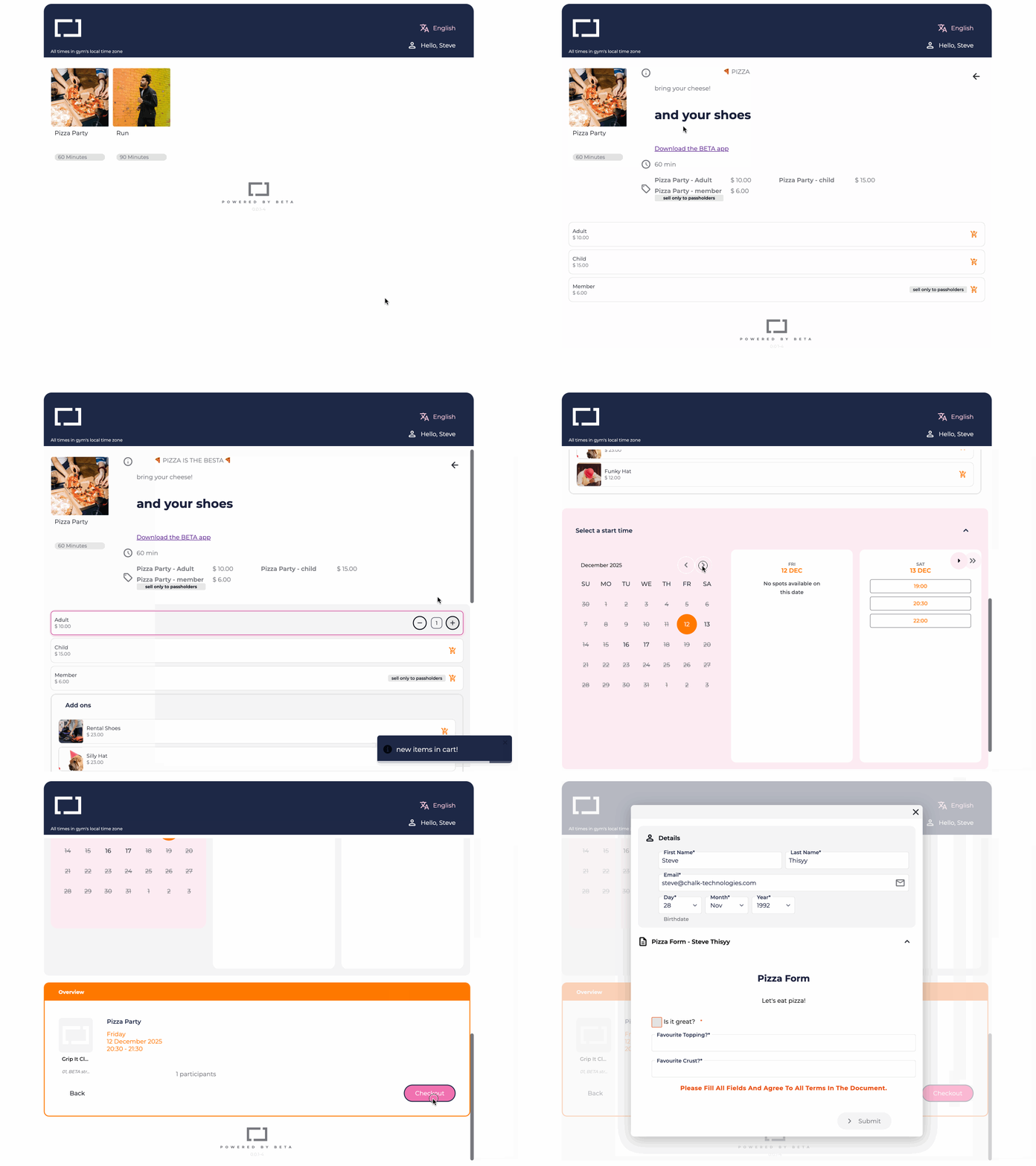
Booking Widgets! A redesigned view for displaying events and courses in a clearer, more structured format. Available for both courses, or events. Available on Business & above.
› Improvements
Improved monthly calendar UI, Template colours and related visual details now display more clearly for easier navigation.
› Features
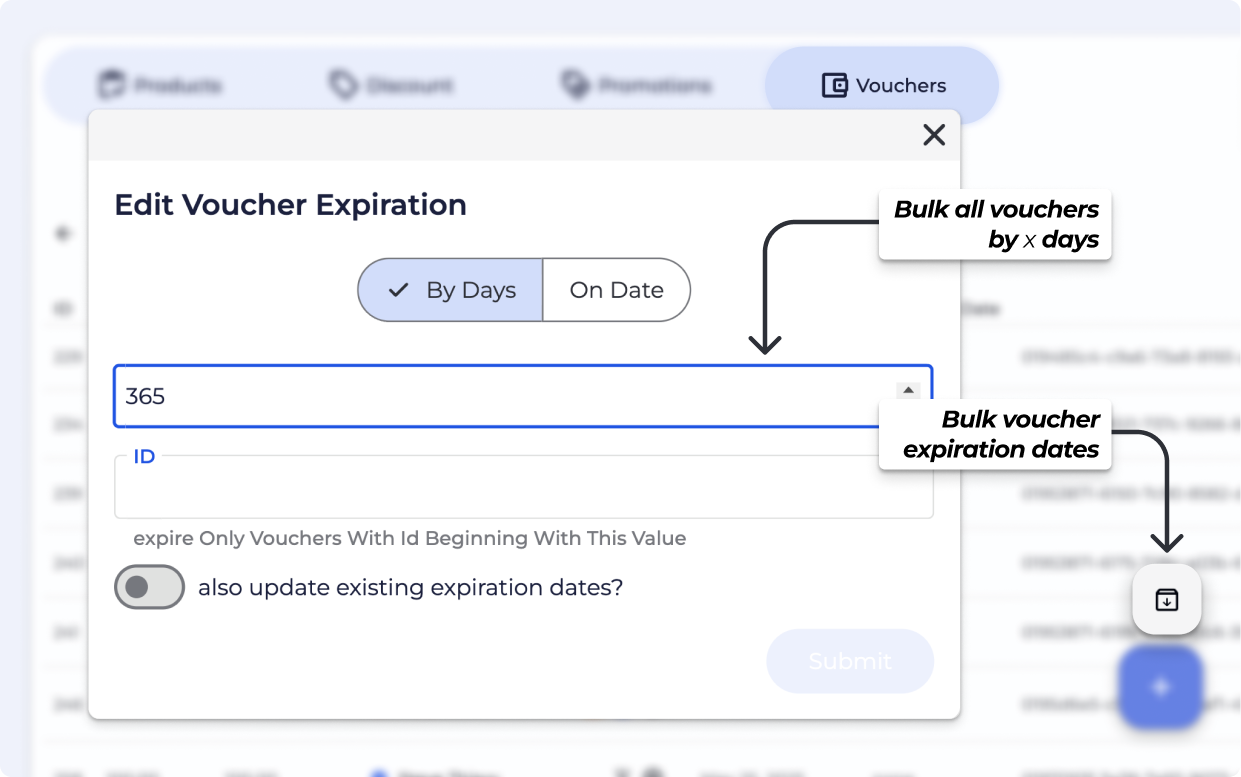
Bulk expire vouchers: Expire vouchers in bulk, by a certain number of days from Purchase date or set all to a fixed date.
Subscription transactional email selection: Choose whether subscription members get the Invoices or Receipts for payments - or no email at all! Navigate to the Manage Subscription Popup » Overview Tab.
› Improvements
Climber duplicate email edit: Simpler handling when an edited email already exists: BETA will link families automatically where possible, and provide a toggle for staff to chose to Link & Edit Email with one click. psst - if a duplicate profile exists, we still suggest merging profiles.
Subscriptions table pagination: Subscriptions now use pagination (for faster loading). Exports/downloads respects filters and will be sent by email.
› Features
BETA now supports Verifactu, Spain’s required electronic invoicing system. This ensures all invoices meet the technical and verification standards set by the Spanish tax authorities. Available to all  Spanish gyms powered by BETA.
› Features
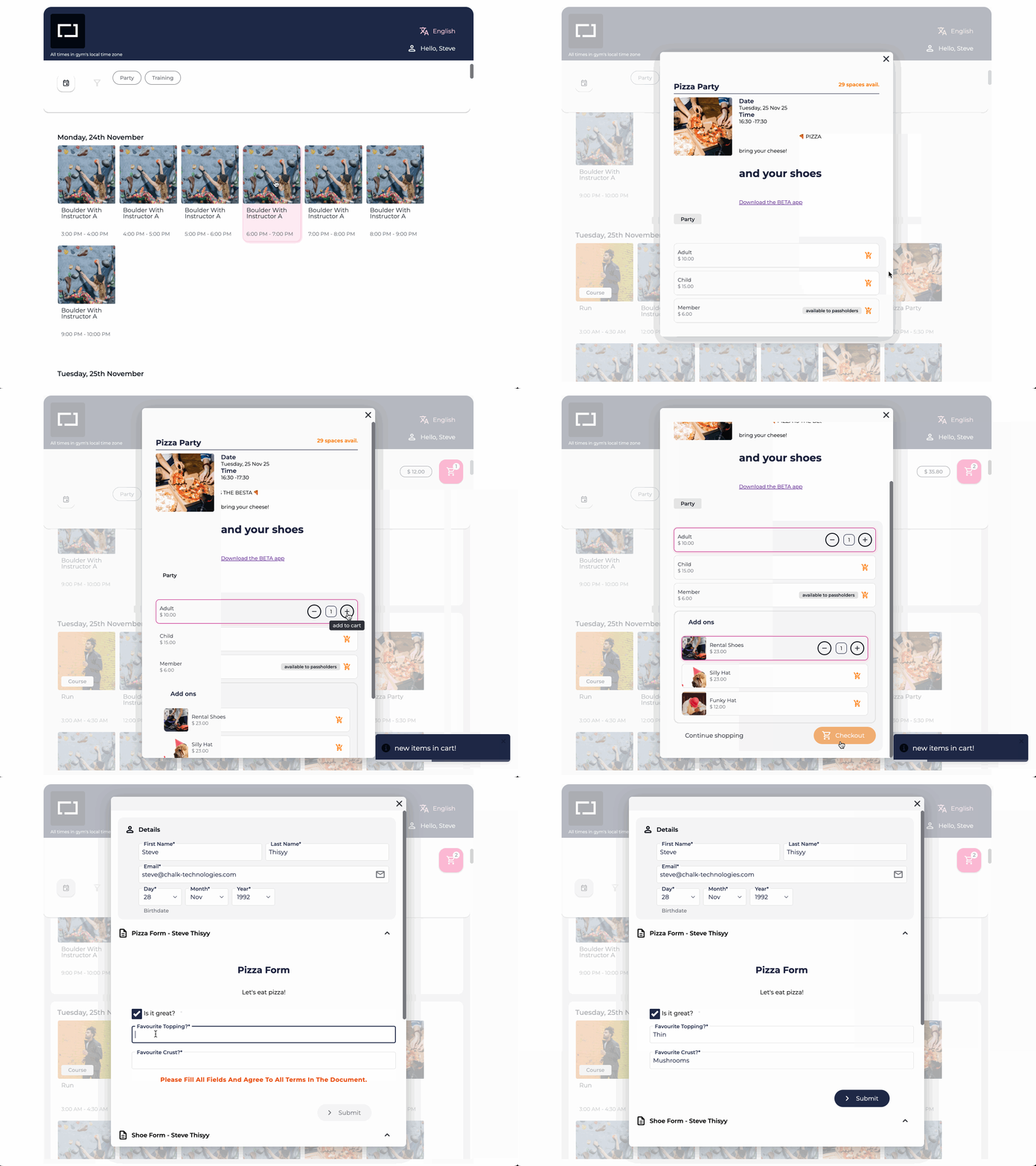
Added “Checkout Now” and “Continue Shopping” buttons to the events/passes widget. This removes extra steps for climbers who want to complete their purchase immediately. Available on Club & above.
Event descriptions now support full HTML. You can add headers, bold text, lists, and other formatted content for clearer event information. Available on Community & above.
Transparent PNG logos are now supported in widgets. To display your gym’s logo, append &showGymLogo=true to your widget URL. Use a square image for best results. Improvements to the widget builder are coming. Available on Enterprise & above.
› Improvements
Courses & Resources: Set the resource on the event template, and if any linked event is blocked or sold out, the entire course becomes unavailable for booking. Available on Enterprise & Above.
› Features
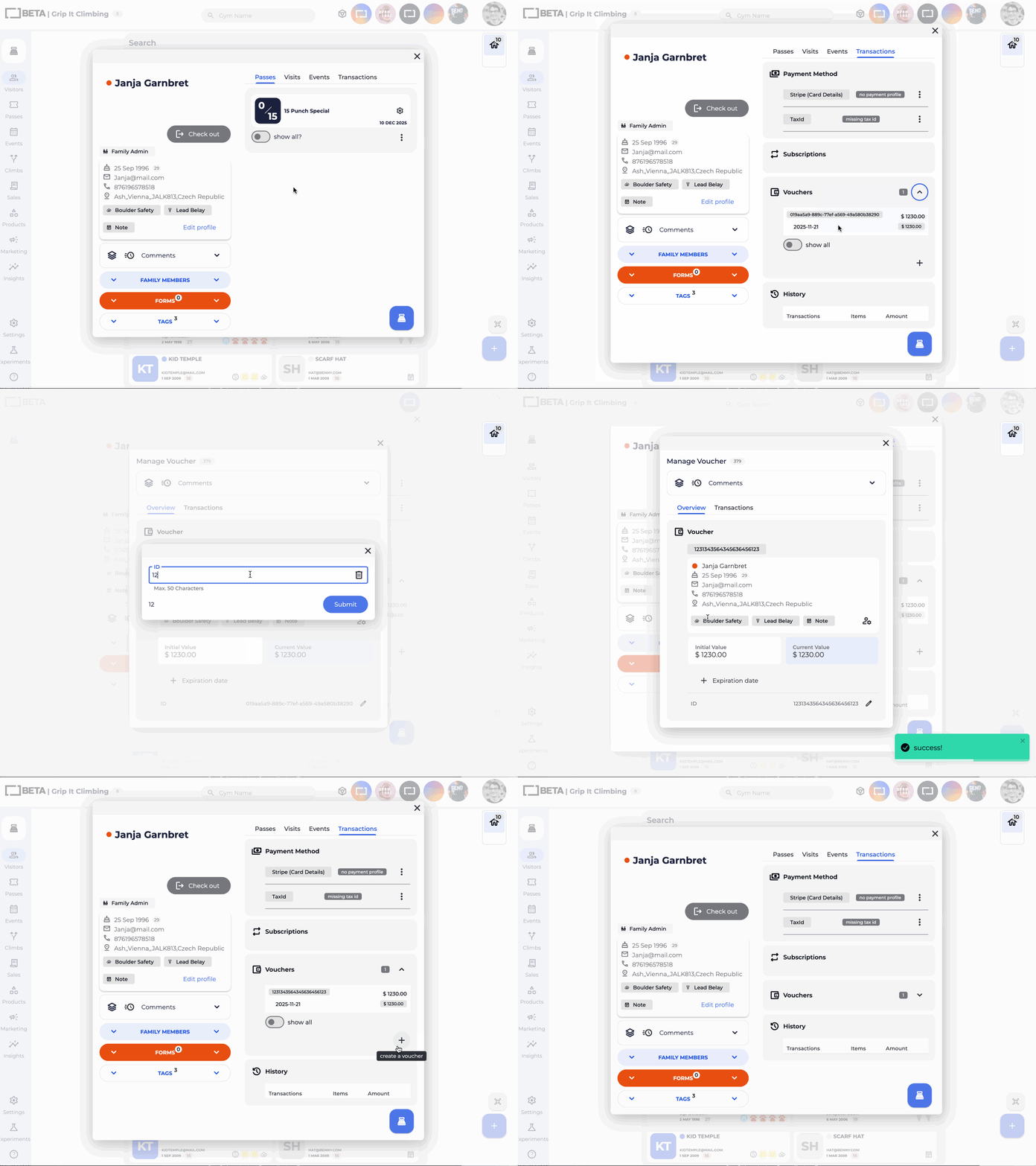
Vouchers in Profiles: Manage vouchers directly from a climber’s profile. Available on Community and above.
Edit Vouchers at the Desk: Staff with Desk Permissions can now update vouchers, including expiry dates and External ID.
Create Vouchers: No longer restricted to owners, managers can now create vouchers with their PIN, directly from a climber profile.
Voucher Logs & Comments: Added clarity around voucher history and internal comments have been added on vouchers. Available on Business Tier and above.
› Improvements
Quick Expiry Buttons: Set voucher expiry in a snap.
Multiple Passes Prioritisation of Use: If a climber has multiple passes on their profile, we’ve set up prioritisation of which pass to be used when the climber checks in.
Preference for a pass that has already been used.
Preference for unlimited passes over limited ones.
Preference for passes that expire sooner.
Rules apply only if specific pass isn’t selected by desk staff when checking in a climber.
› Features
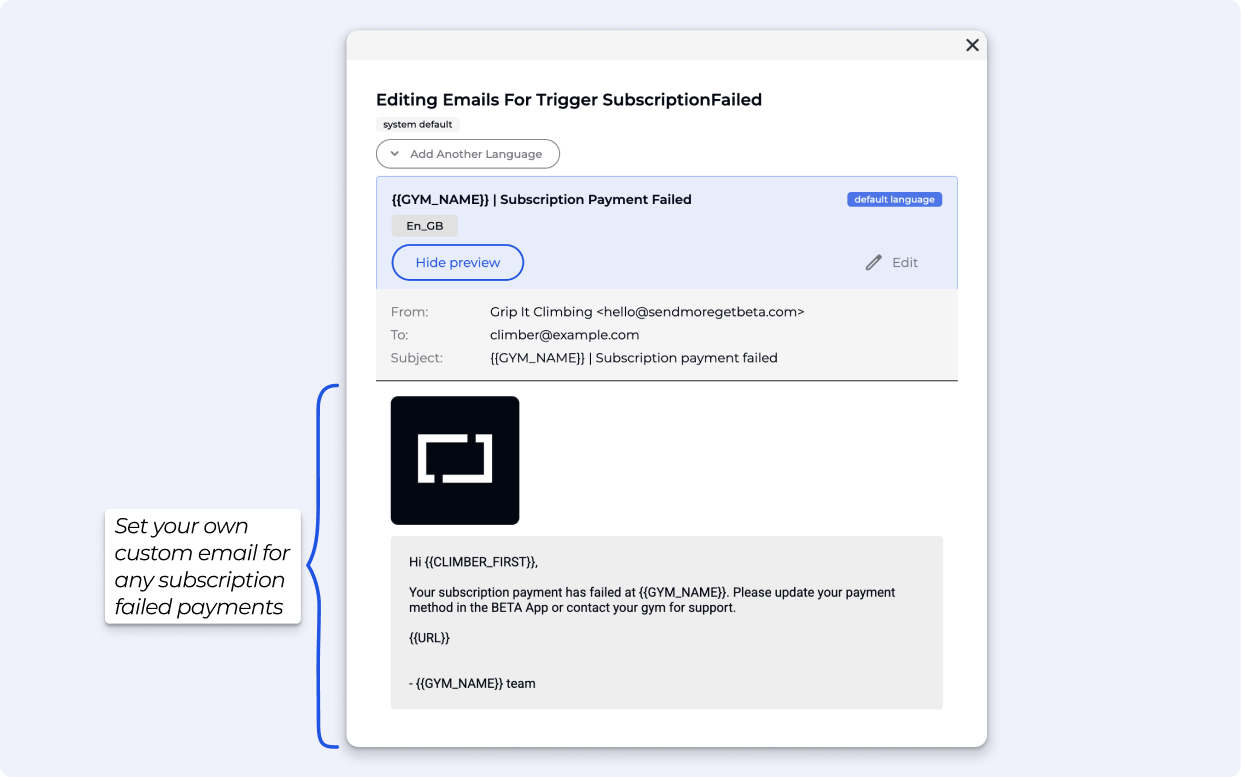
Payment Failed Email: Full customisation of the email sent when a subscription payment fails in Settings » Emails » subscriptionFailed. Available on Club & above.
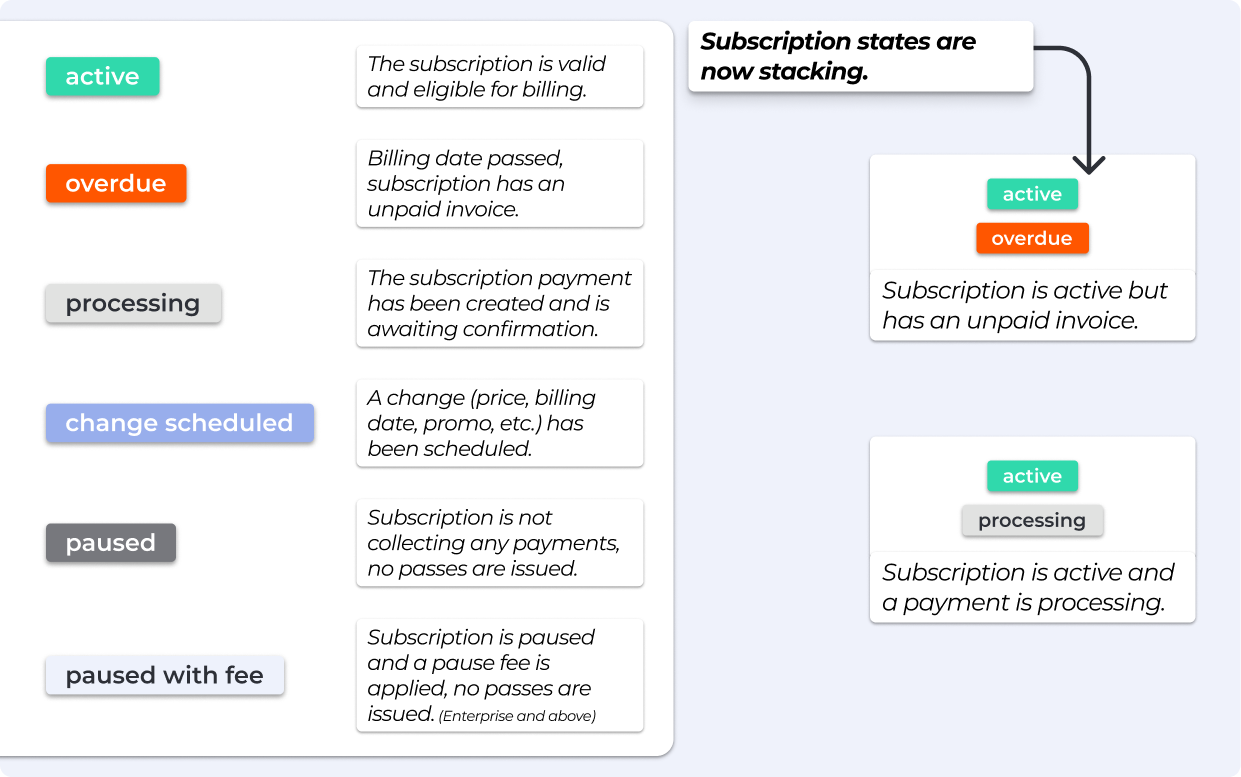
Updated Subscription States: Subscription states can now “stack” for clearer tracking. Available on Club & above.
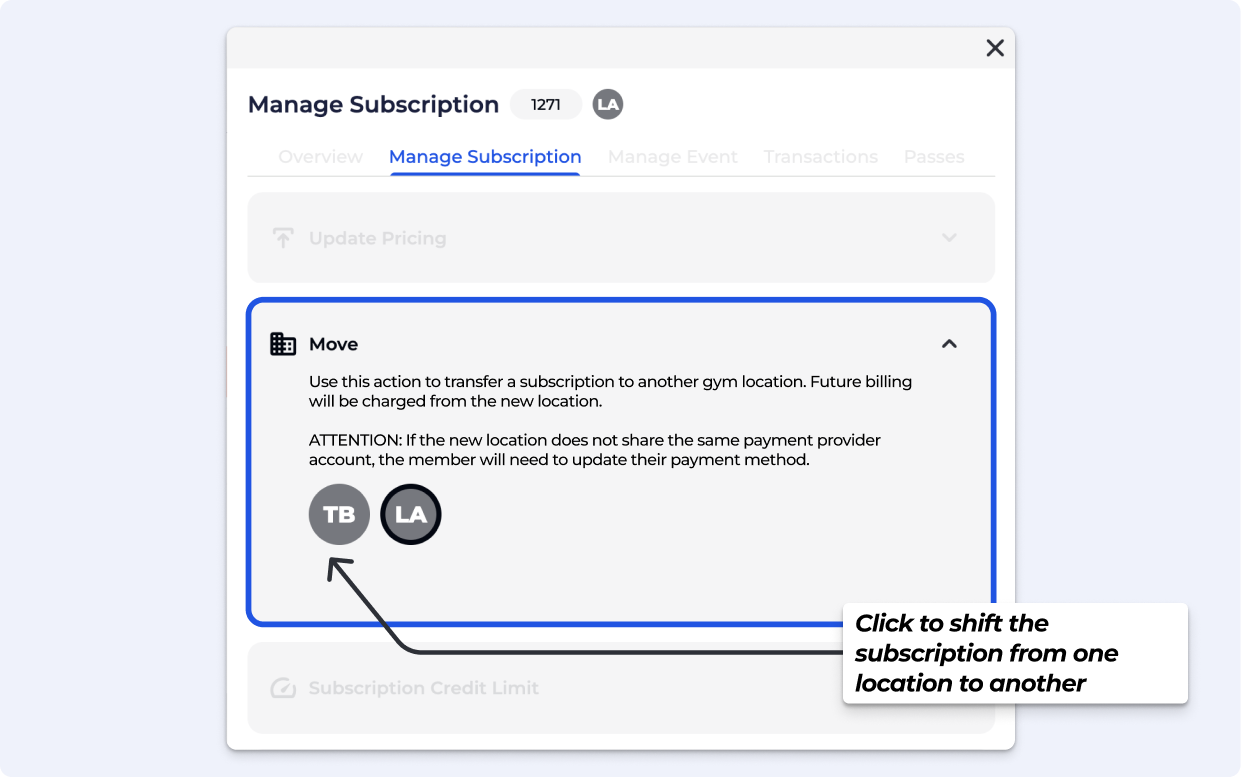
Move Subscriptions Between Locations: Transfer a subscription to another gym location. Future billing will be charged from the new location. Available on Business & above.

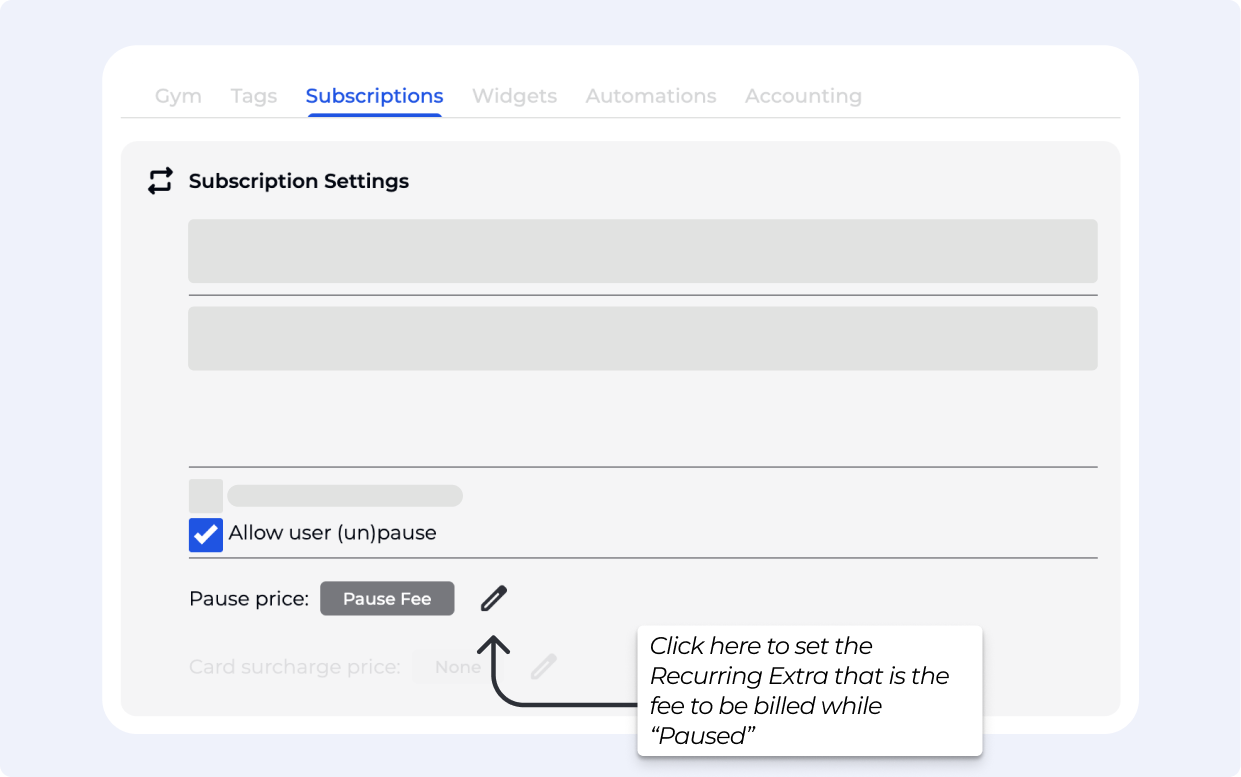
Default Auto Apply Pause Fees: Automatically apply a pause fee when a subscription is paused via the widget. A new subscription state, Pause with Fee, provides extra clarity. Available on Enterprise & above.
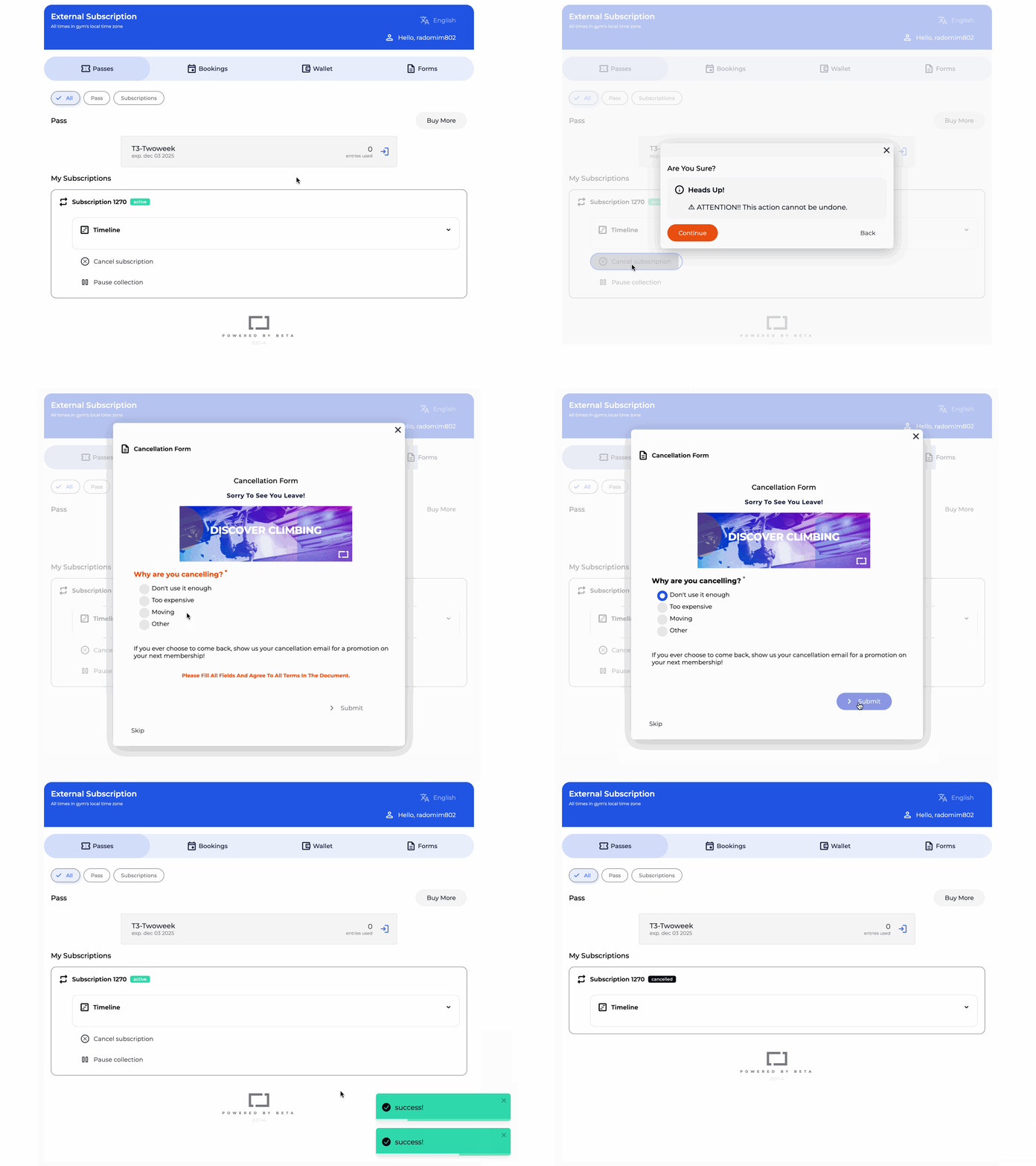
Set Subscription Cancellation Form: Tie a Form to online subscription cancellations for smoother handling. Navigate to the Settings»Subscription Page. Available on Enterprise & above. See what that looks like in the Visitor’s Home.
› Improvements
• Archived tags/proficiencies, will not show in the selection options in the Add a tag & proficiency Pop up.
• Fixed part-cash payments in the Point of Sale.
› Features
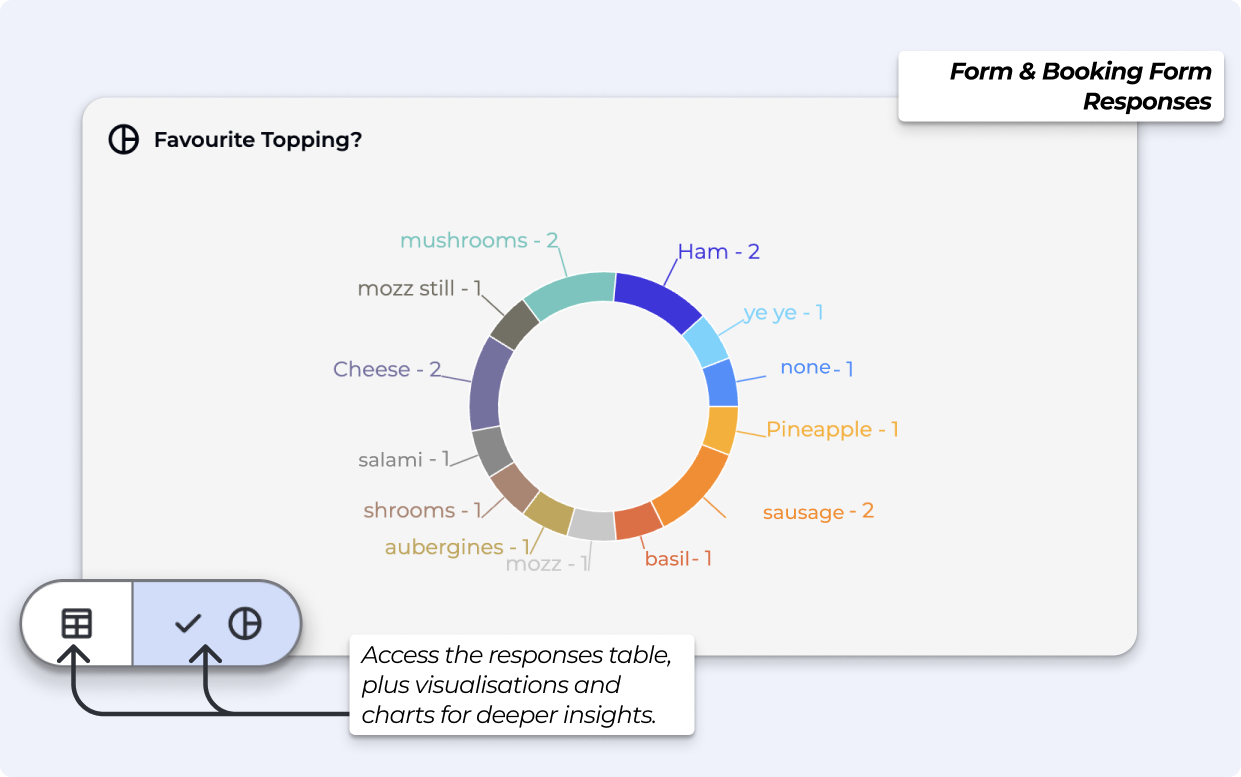
Form Responses: View charts and responses on documents, Booking Forms and Acknowledgment of Risk Forms (AOR). All tiers have access to the responses table, with visualisations and charts available on Business & above.
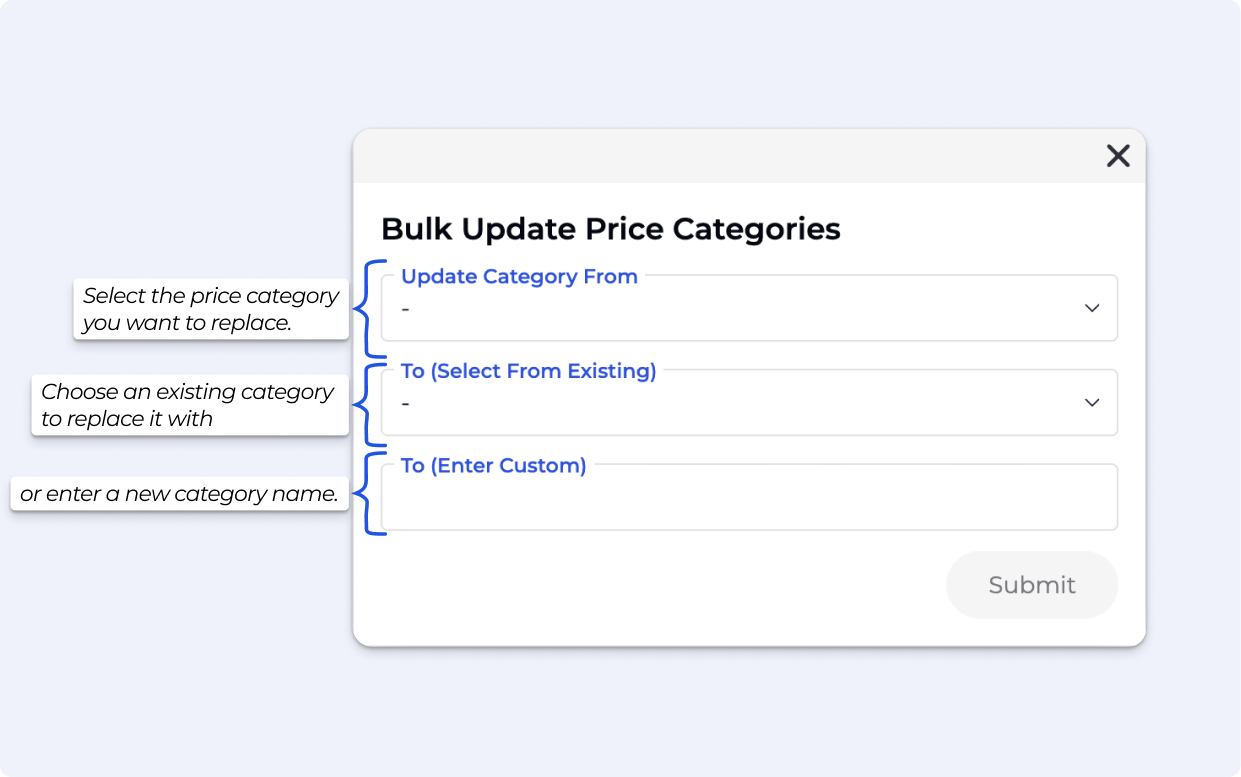
Bulk update price categories with the new Experiments tool, accessible from this link.
› Improvements
• Display the unique ID on products, prices, entry types, event templates & more — for easy and quicker reference.
• Replaced all legacy filter chips with the new unified chip style.
› Features
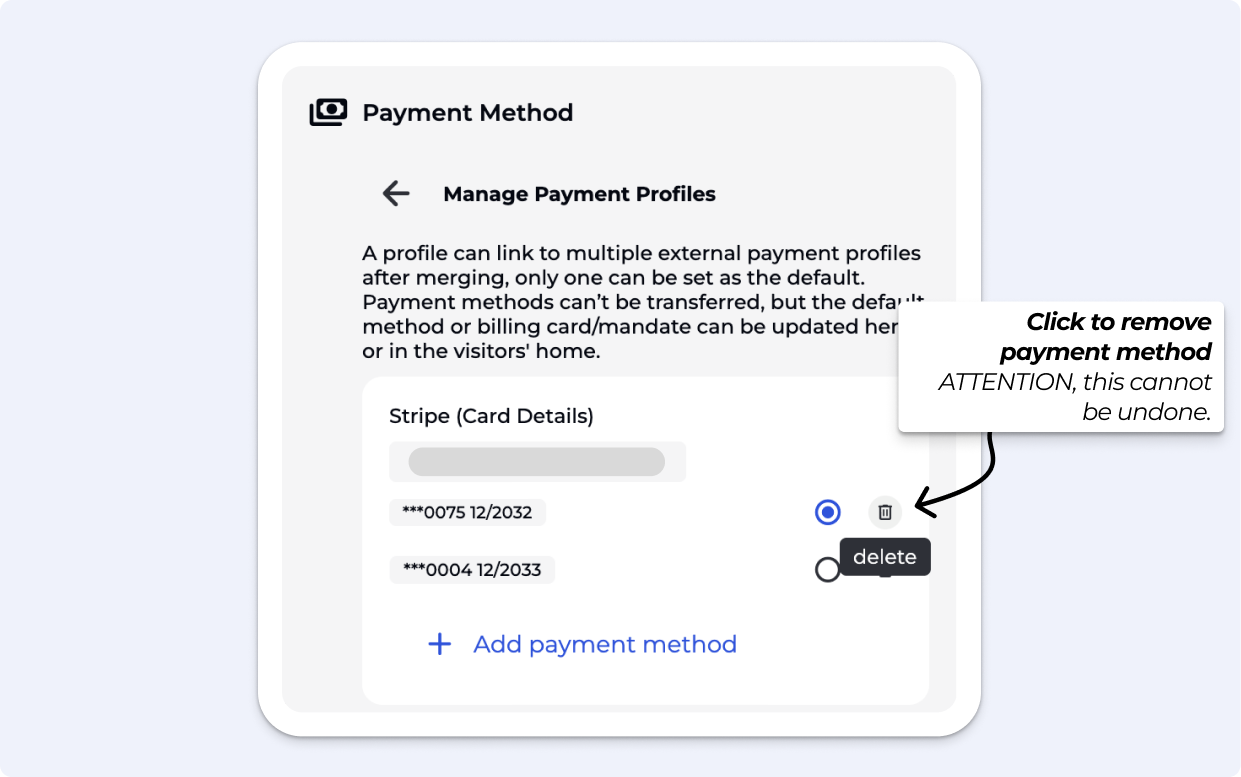
Payment Method Management. Delete saved payment methods directly from Profile » Transactions » Manage Payment Methods.
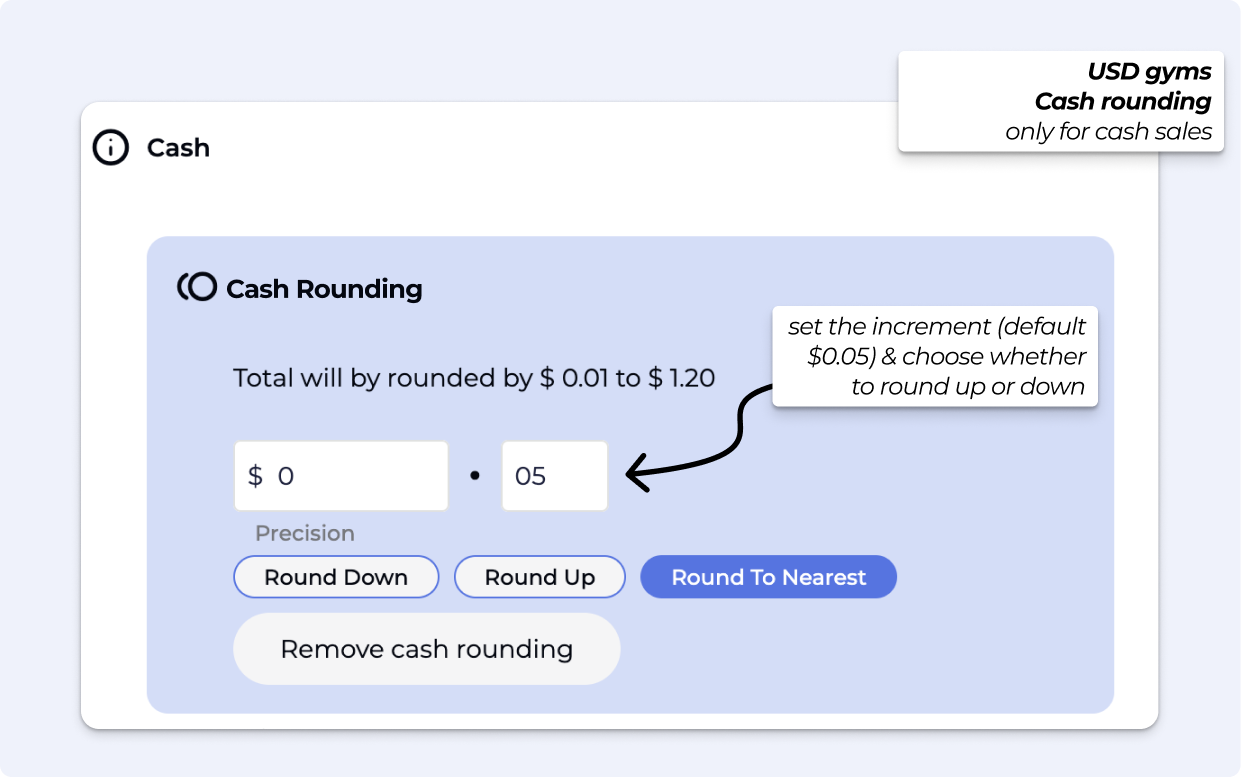
Cash Rounding (POS) for USD cash sales, you can now control rounding values directly in the POS. Set the increment (default $0.05) and choose whether to round up or down.
› Features
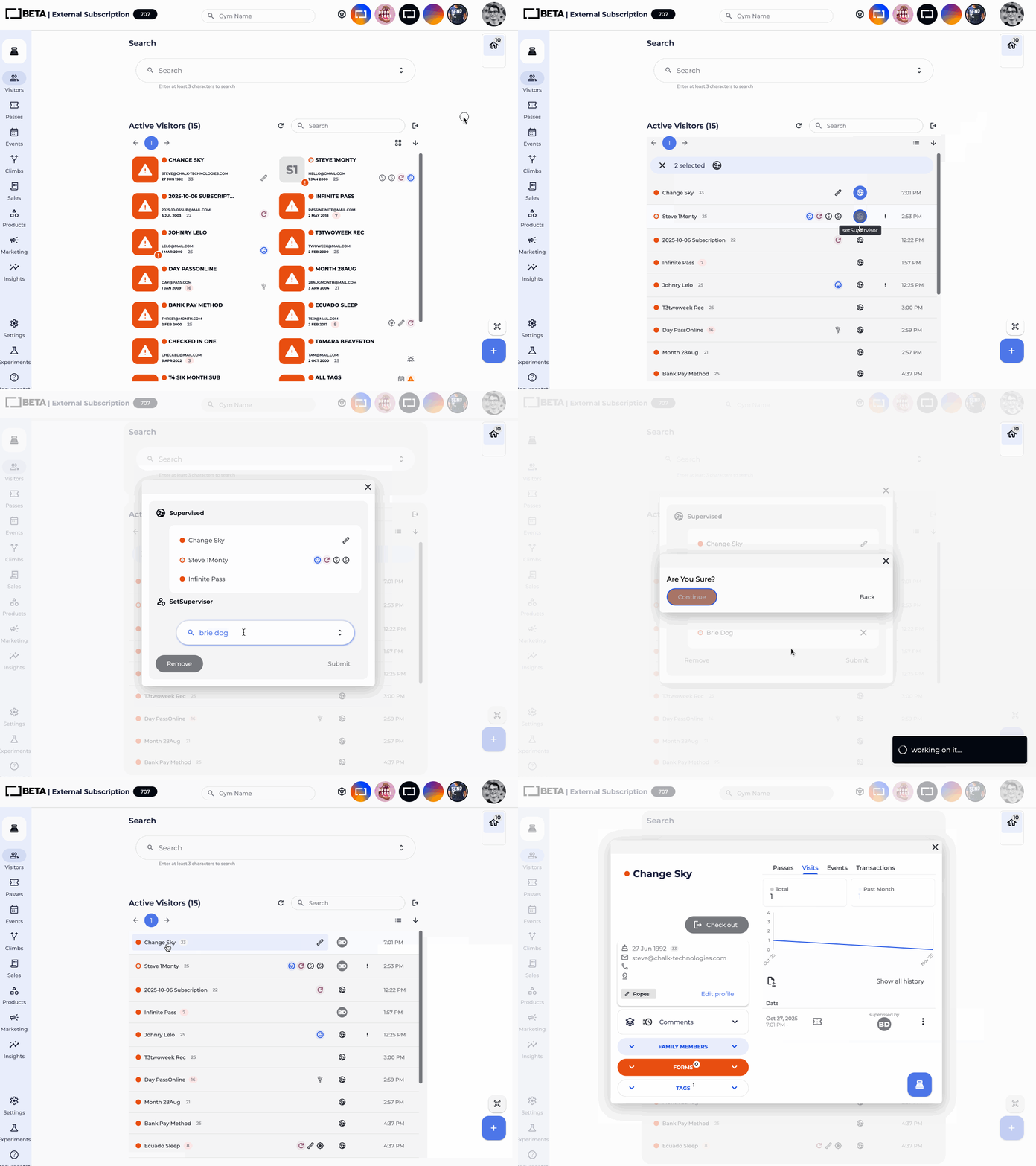
Track supervised and supervising climbers easily, following the latest ABC guidelines. Available on Business & Above.
› Improvements
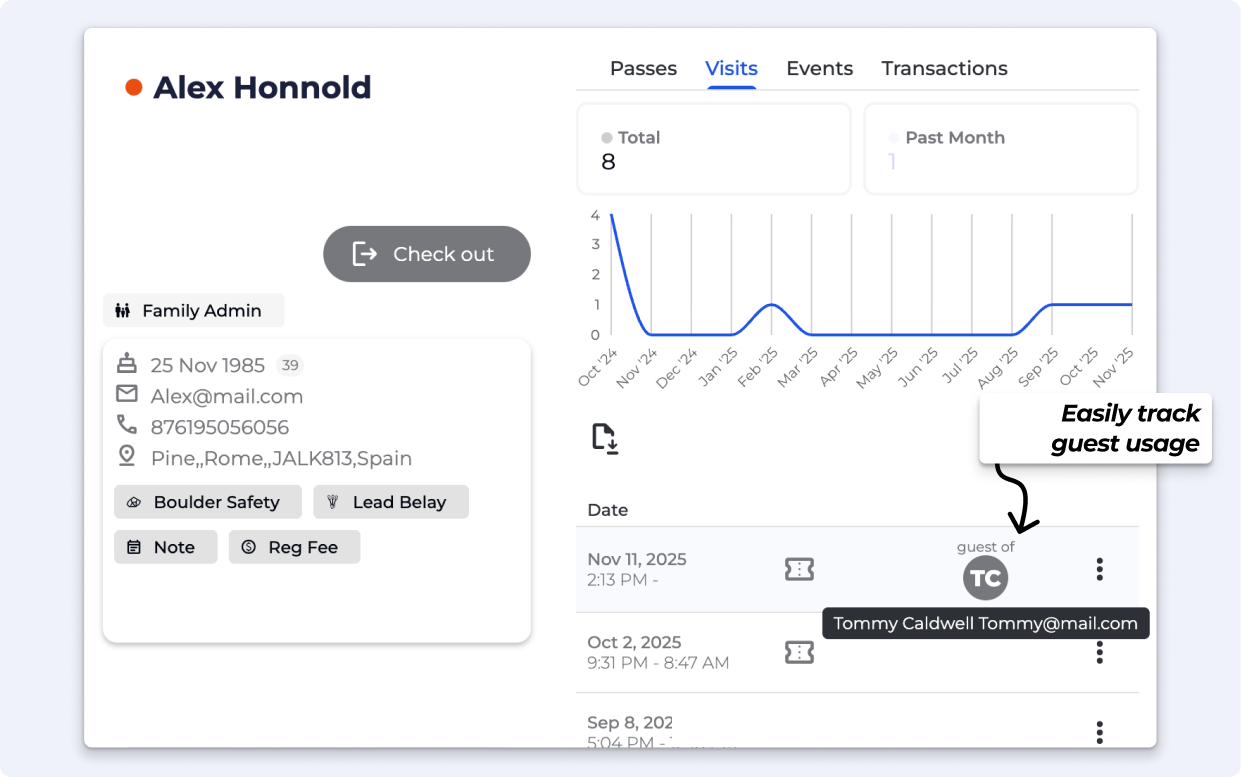
• See guest relationships directly in Profile » Visits, no need to download reports. Available on Community & Above.
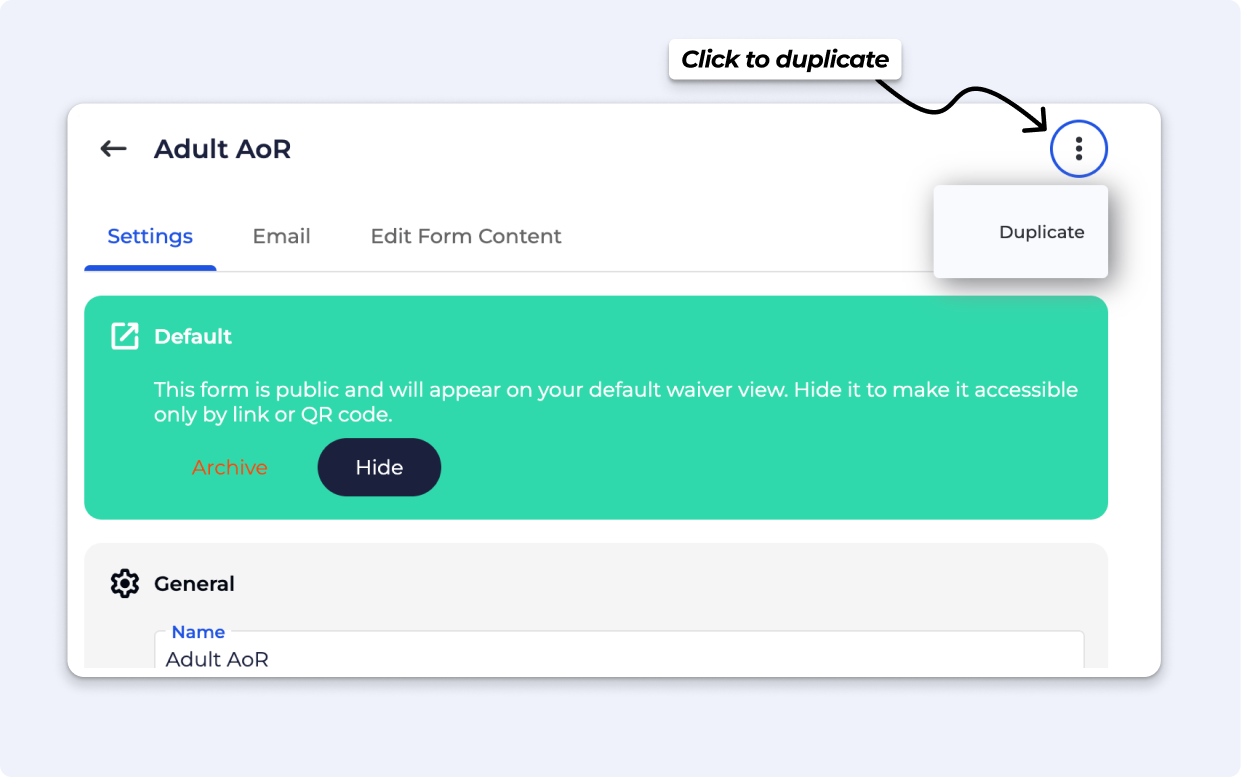
• You can now duplicate a form. This copies all settings and content, except the inheritance rules. Navigate to the ⫶ on the form settings, with Owner permissions.
• Default Automated emails are sent from a noreply email.
› Features
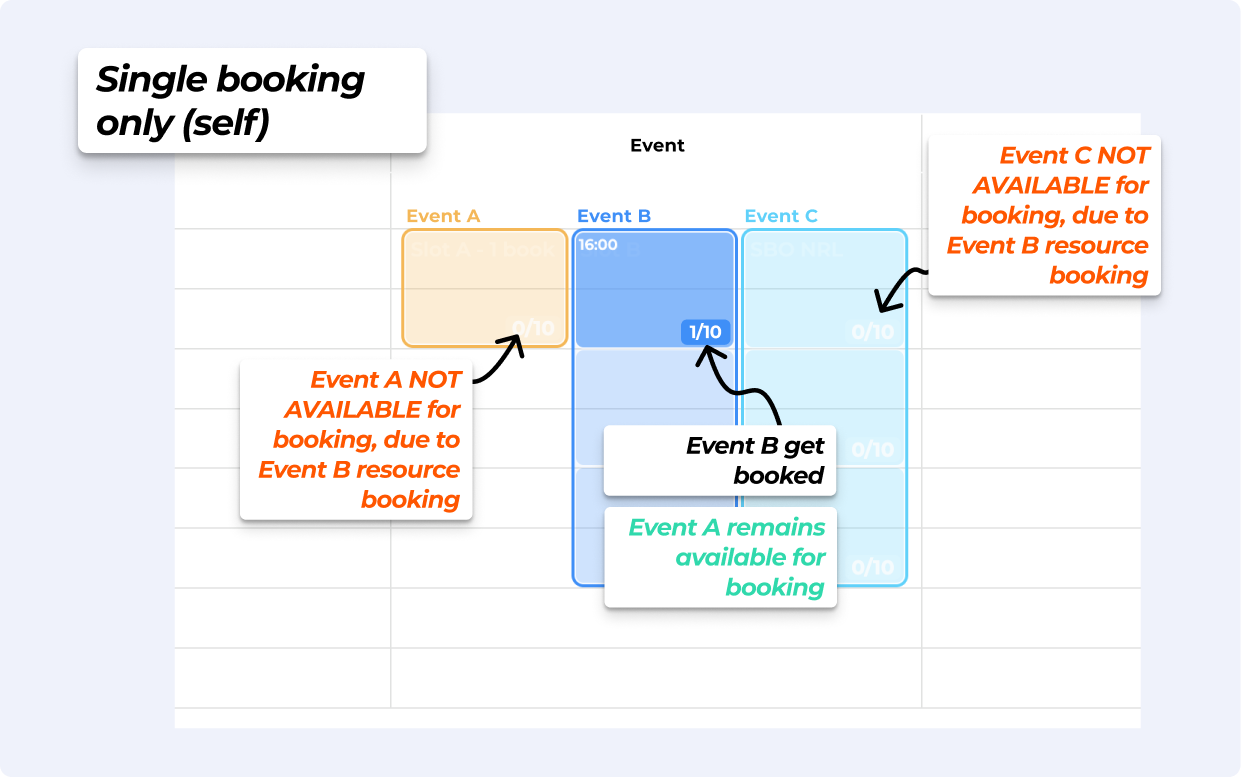
Booking one event tied to a resource cancels all other overlapping scheduled events on the same resource, but the booked event remains available. Available on Business & Above.
This is available across multi-sites too, if the resource is on the Main dashboard.
› Improvements
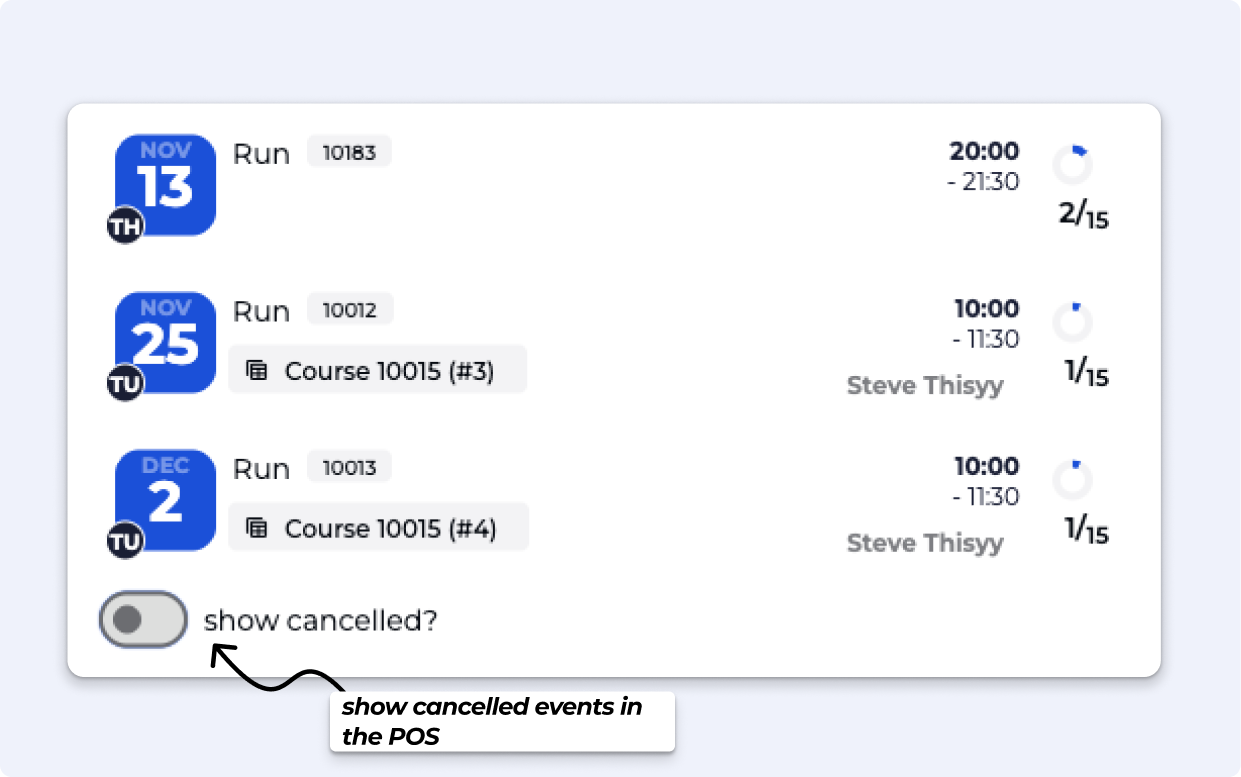
• Show Toggle for Cancelled Events in POS, for clarity on POS Checkout
• Speed Improvements to auto-apply (Tag and Entry Type) promotions.
› Features
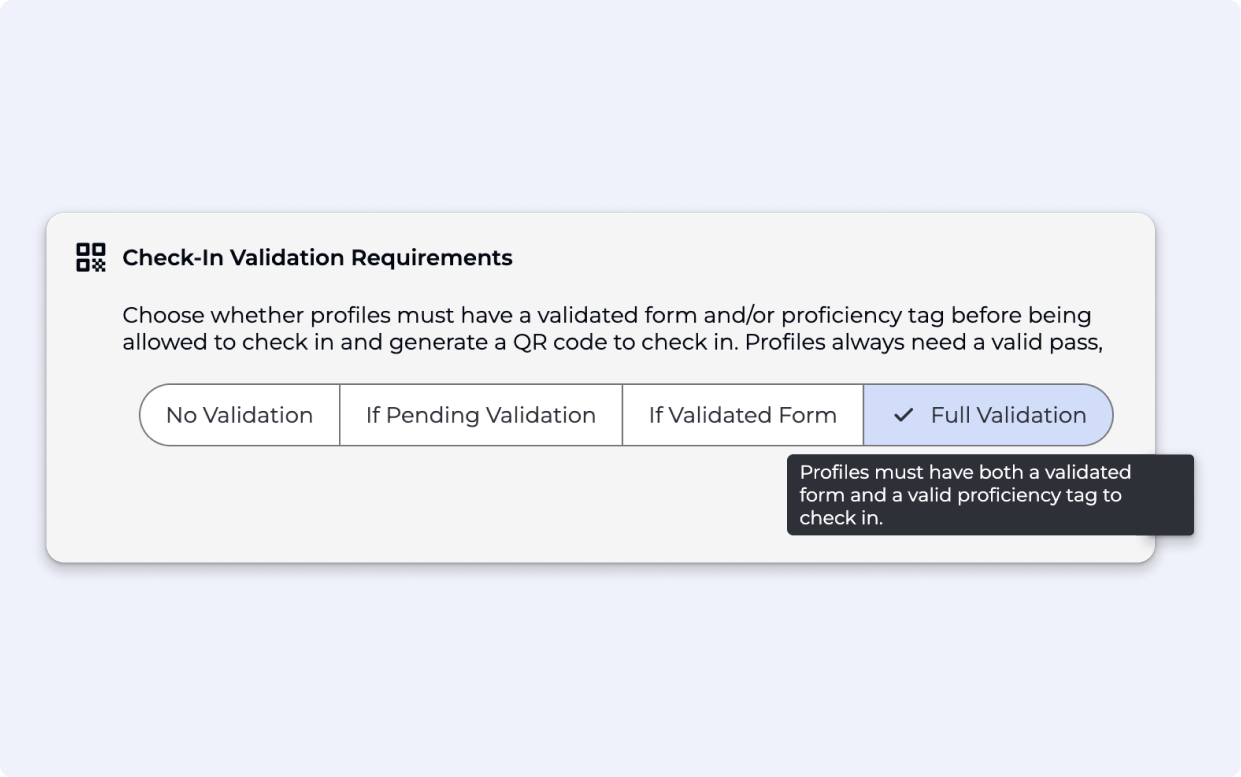
We’ve updated the 'Allow Unverified Auto Check-In' feature, giving you greater control over visitor validation and QR code access to your facility. You can now choose from four verification levels to determine the check-in requirements for visitors:
No Validation: No validation required
If Pending Validation: A form has been signed but is pending validation
If Validated Form: A form has been signed and validated
Full Validation: A proficiency & valid form must be associated with the visitor
› Features
Easily manage climber tags and proficiencies right from profiles. Apply existing tags or create custom ones to track everything from safety checks and supervisor roles to registration fees and gear rentals.
Products can be set to issue tags manually, just like forms (Business)
Tags can trigger popups on profiles or even block entry when required (Enterprise)
Tags can trigger auto-apply Promotions in the BETA app, or Point of Sales (Enterprise)
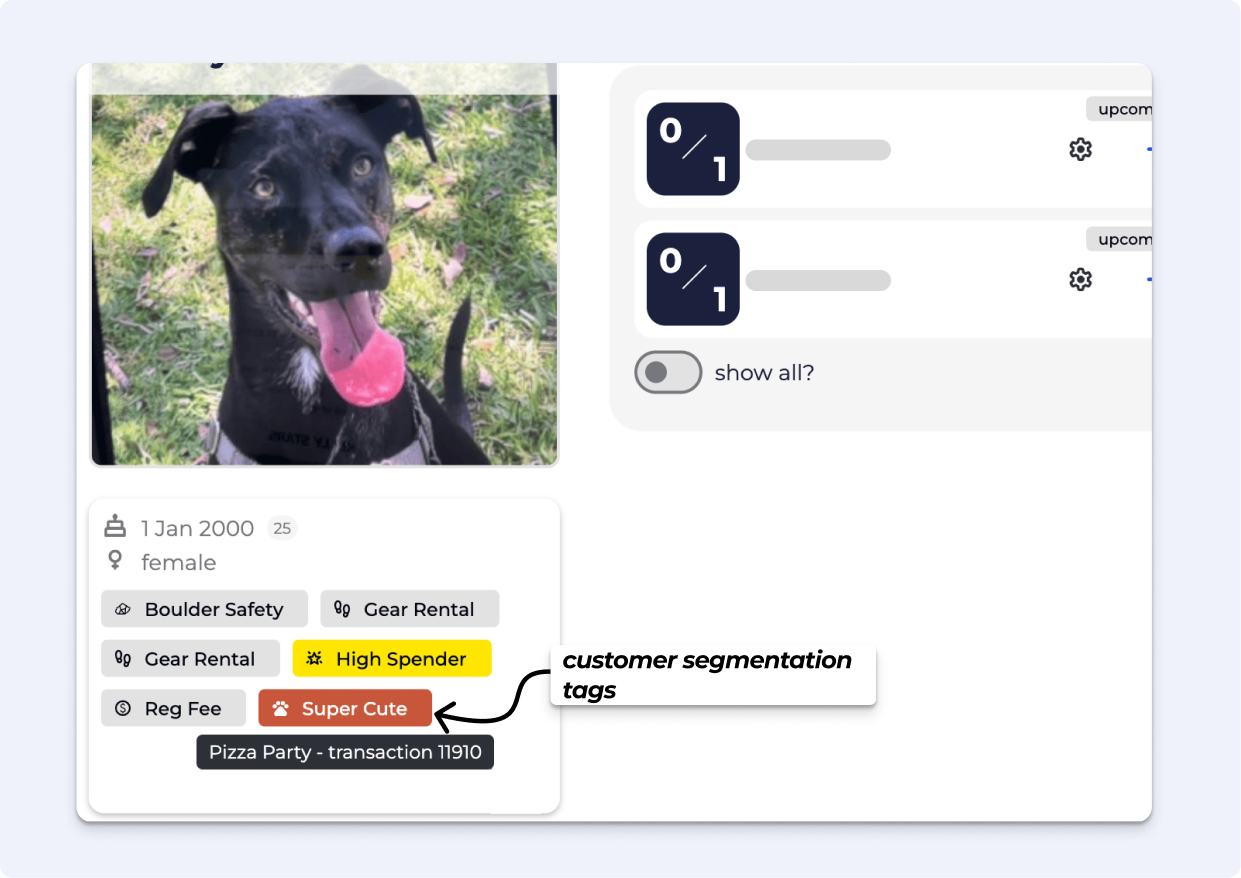
Available on Community tier and above — with custom tags for Enterprise. Keep your team informed and your check-ins smooth — all with a glance.
Read More about Profile Tags ⬀
› Features
› Improvements
This Page is a work in progress - we are currently migrating all of our old Changelogs - so stay tuned!
