This help article will assist you in ensuring your participant event bookings are migrated appropriately.
Event bookings include bookings into special events, courses, competitions, etc.
Before participants can be booked into the correct events scheduled on your BETA calendar, you'll have to create your event and course templates, as these templates are the building blocks used for creating your calendar schedule.
Ensure you’ve reviewed the below guide that walk you through the event/course creation and set up process.
Events Explainer
Create and manage event templates and instances effectively with our guide. Streamline event scheduling, duplication, and resource management.
When migrating to BETA, we require guidance on linking event bookings from your previous provider to the events that are created in BETA. This ensures that all visitors are correctly enrolled in the correct event.
You will be provided with a Mapping Sheet, which allows you to associate your previous events with a corresponding event key in BETA.
Your Mapping Sheet can be found in a shared google drive folder.
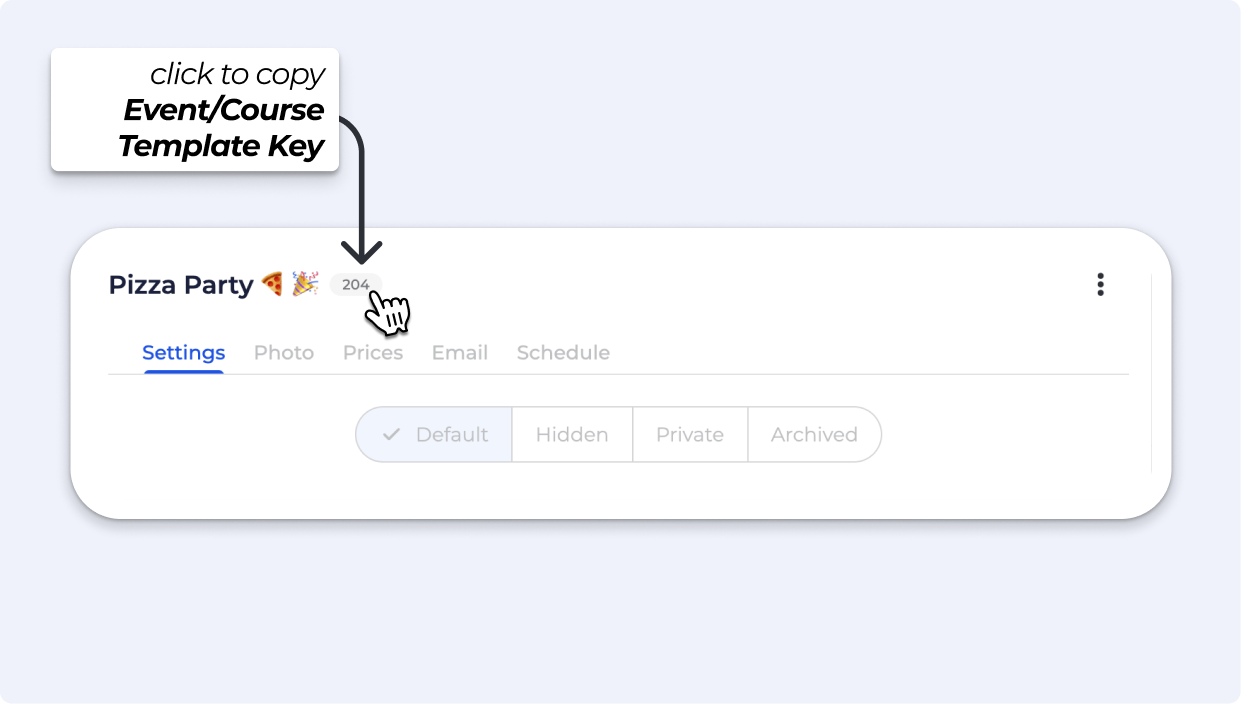
Navigate to the Event/Course Template, and in the Event/Course Template you will find your Event/Course Template Key.


Still Lost? We’ve got you covered!
Use the search box on the main Help to search the entire list of available help guides, or drop your question in the Support Chat!
