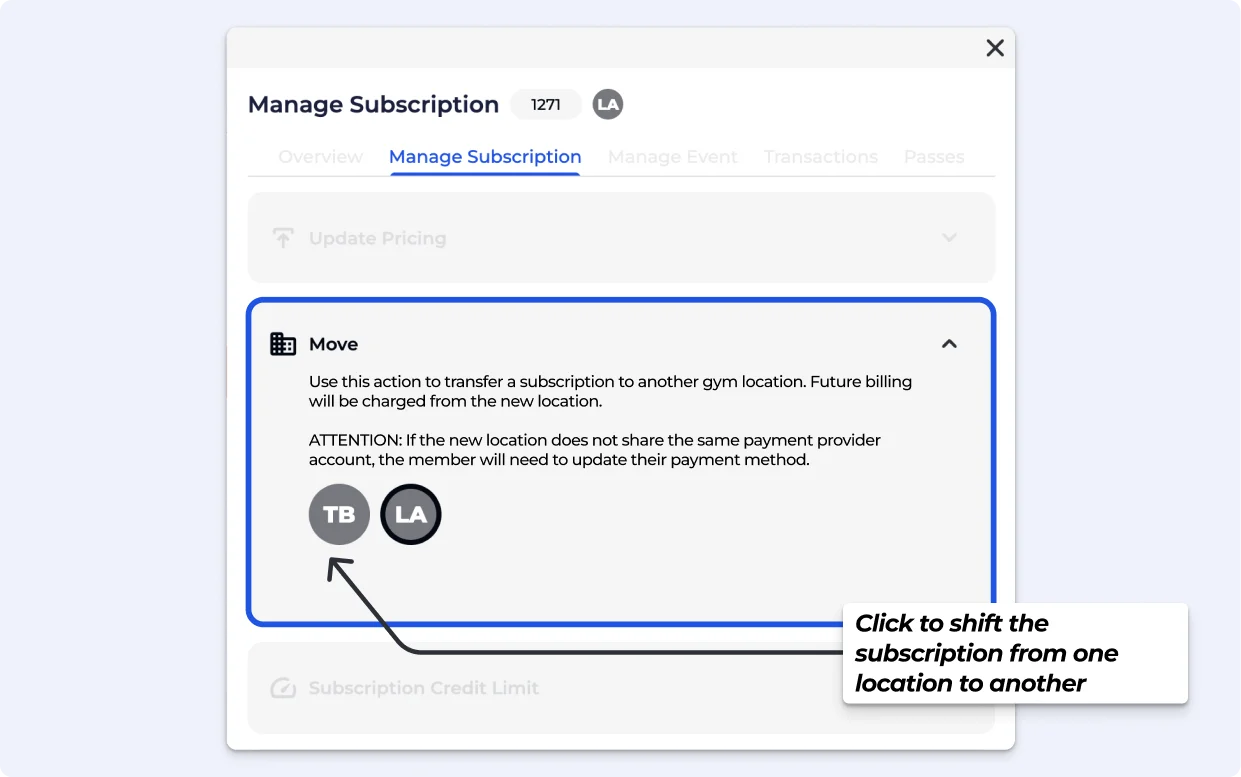
You're reading this guide because a member's subscription needs to be moved from one gym location to another. This is most common when a member switches their home gym, or when your organisation is restructuring locations.

Use this if a member has permanently moved to a different location within your organisation and their subscription should now be managed and billed from there.
Moving a subscription between locations only changes where the member is billed from. It does not control which locations the member can access or check in to. If you need to manage location access or pass permissions, that is handled separately through your access settings — not through this transfer.
See how to edit your Entry Type Settings here:
Configure Entry Types | Rename, Time Entry, Guest Entries & more
Guide to configuring entry types: rename, set time limitations, manage QR codes, enable guest entries, and more for effective pass management on your dashboard.
Go to the BETA Dashboard and open the relevant climber profile.
Navigate to Transactions » Subscriptions
Open up the subscription you want to transfer its location
Navigate to Manage Subscription » Move Subscription’s Location.
Click on the location where you wish to shift the subscription should be transferred to.
Click Submit - you will need Manager & Above permissions.
Confirm the transfer