We understand the importance of a smooth payment process for your gym. It can make a big difference in providing a great experience for your members.
This guide will help you through the process with clear, step-by-step instructions.
Getting your payment systems just right is a key step in setting up your gym for success. But how do you choose the perfect payment provider? We're here to help you figure it out! We've put together a set of simple questions for your gym.
Answering these questions will give you a clearer picture of what your gym really needs and what you're looking for. It's like finding the perfect workout buddy, but in the payment world.
 Get to know Your gym with our prompt questions
How will you be selling your products; through a terminal, online, mobile app or all?
What is the most convenient way for your clients to pay for your services?
Do you want to offer various payment options, like credit cards, digital wallets, or direct debits?
Are you looking for an automated payment solution for recurring memberships?
Are you interested in integrating with specific payment gateways or platforms?
What are the transaction fees associated with the payment provider?
Does the payment provider support recurring billing for membership fees?
Can the payment provider integrate with BETA?
What payment methods does the provider support? Are credit/debit cards, mobile payments, or online wallets accepted?
Are there any setup or monthly fees associated with using the payment provider's services?
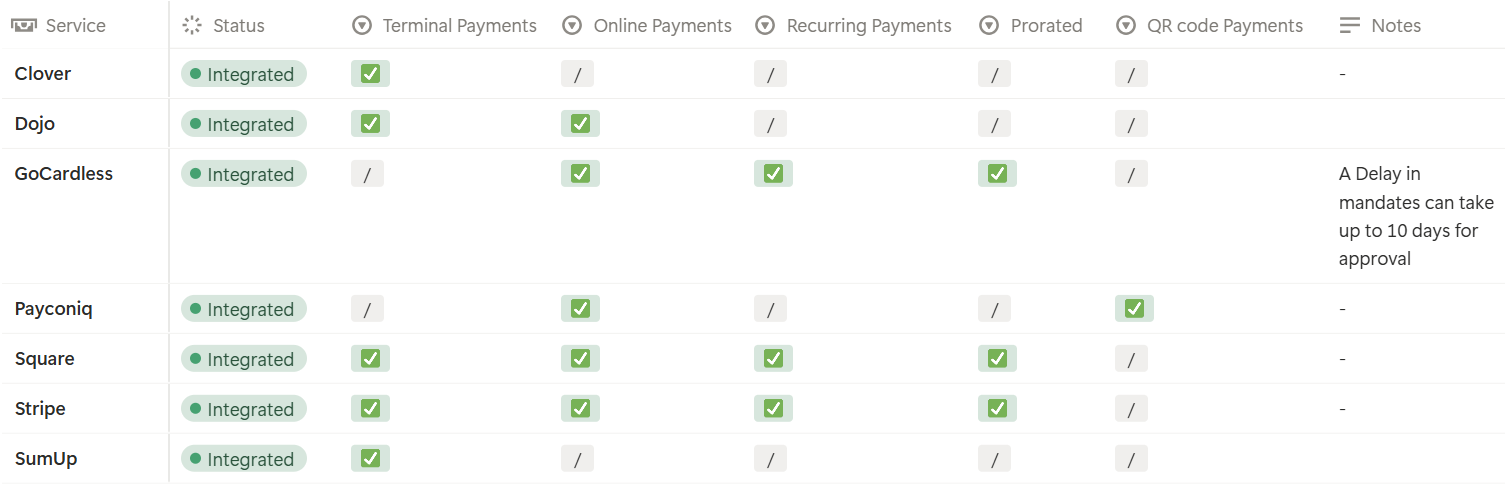
At BETA, we support multiple integrations with payment providers, each offering unique features. You can find a detailed comparison in the table below, helping you select the one that aligns perfectly with your needs.


Once you've chosen one or more payment provider(s), it's time to set up your account. Follow these steps:
Create an account with the payment provider.
Verify your identity as required, the payment provider should guide you through this process.
To accept Integrated payments through BETA, you need to connect with a payment method provider (sometimes called an integrated payment method). This provider securely processes transactions between your customers and your gym’s bank account.
After setup, payments are handled automatically through the integrated provider, and all sales will show in your BETA reports.
Stripe
Learn how to integrate Stripe for online payments, terminal payments, and subscriptions with BETA. This guide covers setup, features, and troubleshooting.
GoCardless
Learn how to integrate GoCardless for direct debit payments on subscriptions.
Dojo
Explore our guide on integrating Dojo payments, enhancing transaction efficiency and customer experience. Follow for setup and activation.
Square
Learn how to integrate Square for online and in-app payments in BETA. This guide covers setup, features, and FAQs for seamless payment processing.
Clover
Set up Clover integration to streamline terminal payments, enhance transaction efficiency, and improve customer experience.
SumUp
Integrate SumUp payment terminals with BETA for seamless terminal payments.
Payconiq
Explore the Payconiq integration guide for seamless online and QR code payments.
It's important to select a payment provider that aligns with your specific needs. BETA supports multiple integrations with providers such as Stripe, Clover, Go Cardless, Square, SumUp, Payconic, and PennyLane. Review the features table above to find the one that best suits your requirements.
Absolutely! You can set up multiple payment providers to offer flexibility to your members. For example, you might use Stripe for online payments and GoCardless for direct debits.
To set up Payconiq, you'll need an API key. Follow our detailed instructions to get your API key from the Payconiq Sales Representative and integrate it with your BETA account.
If you encounter any issues while setting up your payment integration, don't worry. Reach out to our support team, and we'll assist you.
If you have a preferred payment provider that BETA currently does not support, you can leave a feature request on our Roadmap page. We value your feedback and continually work on enhancing our platform based on user suggestions. Your request might become a part of our future integrations!
BETA itself is not required to be PCI DSS compliant. Our system relies on integrated payment providers’ hosted payment forms to collect and process cardholder data. As a result, the responsibility for PCI DSS compliance rests with those payment providers.
If you require further details regarding PCI DSS compliance, please contact your chosen payment provider directly.
